
Help
  • Explore Community
  • Get Started
  • Ask the Community
  • How-To & Best Practices
  • Contact Support
Notifications
Login / Register
Community
Community
Notifications
close
  • Categories
  • Forums
  • Knowledge Center
  • Blogs
  • Ideas
  • Events & Webinars
Help
Help
  • Explore Community
  • Get Started
  • Ask the Community
  • How-To & Best Practices
  • Contact Support
Login / Register
Sustainability
Sustainability

Share Your Feedback – Help Us Improve Search on Community!
Please take a few minutes to participate in our Search Feedback Survey. Your insights will help us deliver the results you need faster and more accurately.
Click here to take the survey

Resetting the user password on the ITA server

ITA FAQ

Search in

Improve your search experience:

  • Exact phrase → Use quotes " " (e.g., "error 404")
  • Wildcard → Use * for partial words (e.g., build*, *tion)
  • AND / OR → Combine keywords (e.g., login AND error, login OR sign‑in)
  • Keep it short → Use 2–3 relevant words , not full sentences
  • Filters → Narrow results by section (Knowledge Base, Users, Products)
cancel
Turn on suggestions
Auto-suggest helps you quickly narrow down your search results by suggesting possible matches as you type.
Showing results for 
Show  only  | Search instead for 
Did you mean: 
  • Home
  • Schneider Electric Community
  • EcoStruxure IT Help Center
  • EcoStruxure IT Help Center Categories
  • IT Advisor
  • ITA FAQ
  • Resetting the user password on the ITA server
Options
  • Mark as New
  • Mark as Read
  • Bookmark
  • Subscribe
  • Email to a Friend
  • Printer Friendly Page
  • Report Inappropriate Content
Invite a Co-worker
Send a co-worker an invite to the portal.Just enter their email address and we'll connect them to register. After joining, they will belong to the same company.
You have entered an invalid email address. Please re-enter the email address.
This co-worker has already been invited to the Exchange portal. Please invite another co-worker.
Please enter email address
Send Invite Cancel
Invitation Sent
Your invitation was sent.Thanks for sharing Exchange with your co-worker.
Send New Invite Close
  • What to do before starting an ITA upgrade
  • Select Custom Properties in the ITA web client
  • Asset visuals in ITA web client
  • Cannot run the IT Advisor desktop client on Mac
  • Are Active Directory and similar integrations avai...
  • Work Order email notifications
  • What counts as a license node in ITA?
  • Upgrading IT Advisor
  • Single sign on in EcoStruxure IT
  • Resetting the user password on the ITA server
  • Reset password for the ITA client
  • Path to migrate from StruxureWare Data Center Oper...
  • NetBotz 750 temperature sensors do not appear in I...
  • NFS mount error in IT Advisor
  • Is the REST API the same for both on-premise and h...
  • Is the ETL integration going away in IT Advisor?
  • Integrating IT Optimize in ITA: Failed to connect ...
  • ITA on-premise step by step installation
  • ITA genome policy
  • Can I model rack mounted UPS and PDU?
  • How to update the Genome Library in ITA
  • Can I model a parallel UPS system?
  • How to start ITA client in a different language
  • Can I migrate/merge from another ITA or DCO
  • How to start EcoStruxure IT Advisor client in a di...
  • Can I log in to IT Advisor using single sign on (S...
  • How to restore a backup file
  • Can I connect more than one rack ATS to a rack PDU
  • How to report an issue
  • Are Insight and Energy Efficiency available in IT ...
  • How to register an IT Advisor server in EcoStruxur...
  • Adding customer via ITA REST web service api
  • How to model a server room
  • How to enable SSL protocol to accept only TLSv1.2 ...
  • How to disable SNMPv1 in ITA
  • How to create a new user to login to the server
  • How to check whether an ITA backup is completed
  • How to associate or unassociate devices from the i...
  • How to add a license in ITA
  • Faulty ”future check” error: It seems the server w...
  • Differences between DCO and ITA
  • Desktop client login issue possible after updating...
  • Configuring email settings in ITA
  • Can I upgrade to ITA on-premise if I have a perpet...
  • Can I upgrade my DCO 7.5 setup to latest ITA?
  • What to do before starting an ITA upgrade
  • Select Custom Properties in the ITA web client
  • Asset visuals in ITA web client
  • Cannot run the IT Advisor desktop client on Mac
  • Are Active Directory and similar integrations avai...
  • Work Order email notifications
  • What counts as a license node in ITA?
  • Upgrading IT Advisor
  • Single sign on in EcoStruxure IT
  • Resetting the user password on the ITA server
  • Reset password for the ITA client
  • Path to migrate from StruxureWare Data Center Oper...
  • NetBotz 750 temperature sensors do not appear in I...
  • NFS mount error in IT Advisor
  • Is the REST API the same for both on-premise and h...
  • Is the ETL integration going away in IT Advisor?
  • Integrating IT Optimize in ITA: Failed to connect ...
  • ITA on-premise step by step installation
  • ITA genome policy
  • Can I model rack mounted UPS and PDU?
  • How to update the Genome Library in ITA
  • Can I model a parallel UPS system?
  • How to start ITA client in a different language
  • Can I migrate/merge from another ITA or DCO
  • How to start EcoStruxure IT Advisor client in a di...
  • Can I log in to IT Advisor using single sign on (S...
  • How to restore a backup file
  • Can I connect more than one rack ATS to a rack PDU
  • How to report an issue
  • Are Insight and Energy Efficiency available in IT ...
  • How to register an IT Advisor server in EcoStruxur...
  • Adding customer via ITA REST web service api
  • How to model a server room
  • How to enable SSL protocol to accept only TLSv1.2 ...
  • How to disable SNMPv1 in ITA
  • How to create a new user to login to the server
  • How to check whether an ITA backup is completed
  • How to associate or unassociate devices from the i...
  • How to add a license in ITA
  • Faulty ”future check” error: It seems the server w...
  • Differences between DCO and ITA
  • Desktop client login issue possible after updating...
  • Configuring email settings in ITA
  • Can I upgrade to ITA on-premise if I have a perpet...
  • Can I upgrade my DCO 7.5 setup to latest ITA?

Related Forums

  • EcoStruxure IT Forum

  • APC UPS Data Center & Enterprise Solutions Forum

Previous Next

Invite a Colleague

Found this content useful? Share it with a Colleague!

Invite a Colleague Invite

EcoStruxure IT Support

Submit a support request for additional assistance with EcoStruxure IT software.

Request Support
Back to ITA FAQ
Start a Topic
Options
  • Mark as New
  • Mark as Read
  • Bookmark
  • Subscribe
  • Email to a Friend
  • Printer Friendly Page
  • Report Inappropriate Content
1 Like
2577 Views

Link copied. Please paste this link to share this article on your social media post.

Trying to translate this page to your language?
Select your language from the translate dropdown in the upper right. arrow
Translate to: English
  • (Français) French
  • (Deutsche) German
  • (Italiano) Italian
  • (Português) Portuguese
  • (Русский) Russian
  • (Español) Spanish

Resetting the user password on the ITA server

Picard EcoStruxureIT
‎2020-08-18 08:42 AM

These instructions apply to the OS user on the ITA server, that is, the user used during the ITA server installation process, and not the ITA user on the desktop and web clients.

To reset the user password on the ITA server:

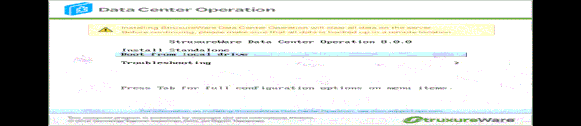
  1. Insert the ITA installation media (USB key, DVD, or out-of-band management (OOM) interface) and reboot the server and ensure the ITA installation media is booted up.

  2. In the installation boot menu select Troubleshooting and then select Rescue a CentOS system.

  3. In rescue mode you are presented with 4 options. Type 1 for 1) Continue and press <return>.

  4. When you see Rescue Mount, press <return> and type chroot /mnt/sysimage.

  5. To change the password type passwd <username> where <username> is the name of the user created during setup.

  6. Type the new password.

  7. To exit chroot type: exit.

  8. Reboot the server by typing reboot.

  9. Remember to remove the ITA installation media.

106205195_1152x250_360012049097.gif106205195_1152x250_360012049097.gif

Was this article helpful? Yes No
No ratings

Link copied. Please paste this link to share this article on your social media post.

Comments
Mr._T
Mr._T Cadet
Cadet
  • Mark as Read
  • Mark as New
  • Bookmark
  • Permalink
  • Print
  • Email to a Friend
  • Report Inappropriate Content
‎2025-06-24 04:19 AM

Hi Team,


What is the best approach for resetting the Webmin Root Account Password on ITA v9.5.1?


Regards,


Tafadzwa.

gsterling
Captain gsterling Captain
Captain
  • Mark as Read
  • Mark as New
  • Bookmark
  • Permalink
  • Print
  • Email to a Friend
  • Report Inappropriate Content
‎2025-06-25 05:01 AM

Hello Mr._T, its been a while since I've had the pleasure to respond to you.


Are you able to login to your IT Advisor server using SSH as the root user? Normally the webmin root password is the same as the operating system (rocky linux) root password. If you run this command after you have logged into the ITA server using SSH:


sudo cat /etc/webmin/miniserv.users


the output will list all of the users defined to use webmin. If you see "root:x:0" in the output, the "x" means the operating system password is being used for root. If there's a hash in the ":x:" field then a password for root's webmin user was set... if you edit that field, replace the hash with the ":x:" like above then the operating system root password will be used. If you can run "sudo" then you can reset the root password (those instructions are further below).


Does your setup/configuration include a defined administrator user setup when the operating system was installed? Many customers define an "apc" user but it of course may be something else. If that user was defined as an administrator user then it should also be able to login to webmin. Once logged in, you can use webmin's users view to change passwords.


Or if you can login to the rocky linux operating system using SSH, and use "sudo" you can try changing root's password, then try logging into webmin using those credentials.

sudo passwd root 


Regards


Greg Sterling


Mr._T
Mr._T Cadet
Cadet
  • Mark as Read
  • Mark as New
  • Bookmark
  • Permalink
  • Print
  • Email to a Friend
  • Report Inappropriate Content
‎2025-06-25 09:26 AM

Hi @gsterling 


Thank you for your feedback as always.

I have not gone back to the customer since I posted that question however I managed to play around on our Test environment and I eventually got it right using the steps mentioned in the original post. 

It just seems like some options have changed since moving from DCO to ITA affecting step 1.


Regards,


Tafadzwa.

You’ve reached the end of your document

WHAT’S NEXT?

Ask our Experts

Didn't find what you are looking for? Ask our experts!

My Dashboard

Check out the new Feeds and activities that are relevant to you.

To The Top!

Forums

  • APC UPS Data Center Backup Solutions
  • EcoStruxure IT
  • EcoStruxure Geo SCADA Expert
  • Metering & Power Quality
  • Schneider Electric Wiser

Knowledge Center

Events & webinars

Ideas

Blogs

Get Started

  • Ask the Community
  • Community Guidelines
  • Community User Guide
  • How-To & Best Practice
  • Experts Leaderboard
  • Contact Support

    Ask our Experts

    Have a question related to our products, solutions or services? Get quick support on community Forums

    Email Us

    For Community platform-related support, please email us

Brand-Logo
Subscribing is a smart move!
You can subscribe to this board after you log in or create your free account.
Forum-Icon

Create your free account or log in to subscribe to the board - and gain access to more than 10,000+ support articles along with insights from experts and peers.

Register today for FREE

Register Now

Already have an account? Login

Terms & Conditions Privacy Notice Change your Cookie Settings © 2025 Schneider Electric

Welcome!

Welcome to your new personalized space.

of

Explore