
Help
  • Explore Community
  • Get Started
  • Ask the Community
  • How-To & Best Practices
  • Contact Support
Notifications
Login / Register
Community
Community
Notifications
close
  • Categories
  • Forums
  • Knowledge Center
  • Blogs
  • Ideas
  • Events & Webinars
Help
Help
  • Explore Community
  • Get Started
  • Ask the Community
  • How-To & Best Practices
  • Contact Support
Login / Register
Sustainability
Sustainability

Share Your Feedback – Help Us Improve Search on Community!
Please take a few minutes to participate in our Search Feedback Survey. Your insights will help us deliver the results you need faster and more accurately.
Click here to take the survey

Viewing Alarms From External Systems

Viewing alarms from external systems

Search in

Improve your search experience:

  • Exact phrase → Use quotes " " (e.g., "error 404")
  • Wildcard → Use * for partial words (e.g., build*, *tion)
  • AND / OR → Combine keywords (e.g., login AND error, login OR sign‑in)
  • Keep it short → Use 2–3 relevant words , not full sentences
  • Filters → Narrow results by section (Knowledge Base, Users, Products)
cancel
Turn on suggestions
Auto-suggest helps you quickly narrow down your search results by suggesting possible matches as you type.
Showing results for 
Show  only  | Search instead for 
Did you mean: 
  • Home
  • Schneider Electric Community
  • EcoStruxure IT Help Center
  • EcoStruxure IT Help Center Categories
  • IT Advisor
  • ITA desktop client
  • Working in the ITA desktop client
  • Viewing alarms from external systems
  • Viewing Alarms From External Systems
Options
  • Mark as New
  • Mark as Read
  • Bookmark
  • Subscribe
  • Email to a Friend
  • Printer Friendly Page
  • Report Inappropriate Content
Invite a Co-worker
Send a co-worker an invite to the portal.Just enter their email address and we'll connect them to register. After joining, they will belong to the same company.
You have entered an invalid email address. Please re-enter the email address.
This co-worker has already been invited to the Exchange portal. Please invite another co-worker.
Please enter email address
Send Invite Cancel
Invitation Sent
Your invitation was sent.Thanks for sharing Exchange with your co-worker.
Send New Invite Close
  • Viewing Alarms From External Systems
  • Showing Alarms for Selected Equipment Only
  • Locating Alarms on Failing Equipment in the Layout
  • Acknowledging alarm notifications from Data Center...
  • Viewing Alarms From External Systems
  • Showing Alarms for Selected Equipment Only
  • Locating Alarms on Failing Equipment in the Layout
  • Acknowledging alarm notifications from Data Center...

Related Forums

  • EcoStruxure IT Forum

  • APC UPS Data Center & Enterprise Solutions Forum

Previous Next

Invite a Colleague

Found this content useful? Share it with a Colleague!

Invite a Colleague Invite

EcoStruxure IT Support

Submit a support request for additional assistance with EcoStruxure IT software.

Request Support
Back to Viewing alarms from external systems
Start a Topic
Options
  • Mark as New
  • Mark as Read
  • Bookmark
  • Subscribe
  • Email to a Friend
  • Printer Friendly Page
  • Report Inappropriate Content
0 Likes
823 Views

Link copied. Please paste this link to share this article on your social media post.

Trying to translate this page to your language?
Select your language from the translate dropdown in the upper right. arrow
Translate to: English
  • (Français) French
  • (Deutsche) German
  • (Italiano) Italian
  • (Português) Portuguese
  • (Русский) Russian
  • (Español) Spanish

Viewing Alarms From External Systems

Picard EcoStruxureIT
‎2019-11-06 07:13 AM

Viewing alarms from external systems

When the system is configured to support integration with external systems, alarms from devices in external systems associated with modeled components are highlighted in the layout. You can easily locate failing equipment and servers that might be impacted by the failure.

An icon in the Status bar with a pop-up notification informs you of active alarms on devices monitored by an external system. Clicking the icon will open the Alarms pane with a list of all alarms from external systems. An alarm icon also appears next to the device with the alarm in the Unassociated Devices pane.

Alarms may occur with different severities: information, warning, error, critical and failure.

Clicking an alarm in the Alarms pane list opens the alarm details for the selected alarm, including recommended actions for resolving the issue.

Right-clicking an alarm in the Alarms pane and selecting Show in Navigation or Show in Editor identifies and highlights the component with the alarm in the Floor Layout, Rack Layout, or Navigation.

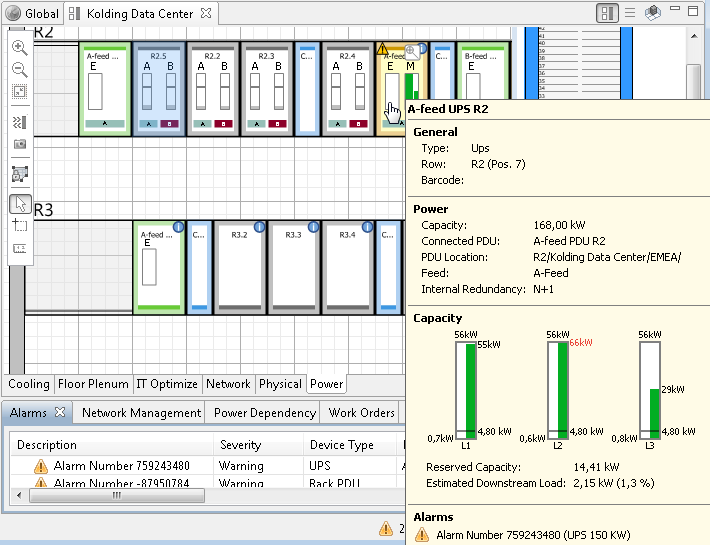
Alarm icons in the system help you identify the exact location of the alarms in the data center model, for example on a specific UPS in the floor layout, and help you identify the severity of the alarm.

Alarm types

Info

Warning

Error, Critical, and Failure

102237242_360038496593.png102237242_360038496593.png

102237236_360038496593.png102237236_360038496593.png

102237235_360038496593.png102237235_360038496593.png

If enabled in Tools>Preferences, the tool tips include information about active alarms in Rack Layout (on rack-mountable equipment) and Floor Layout (on equipment in the floor, e.g. UPS).

You can view the device with the alarm on the external system by right-clicking and selecting Launch to Device.

102237233_360038496593.png102237233_360038496593.png

Was this article helpful? Yes No
No ratings

Link copied. Please paste this link to share this article on your social media post.

You’ve reached the end of your document

WHAT’S NEXT?

Ask our Experts

Didn't find what you are looking for? Ask our experts!

My Dashboard

Check out the new Feeds and activities that are relevant to you.

To The Top!

Forums

  • APC UPS Data Center Backup Solutions
  • EcoStruxure IT
  • EcoStruxure Geo SCADA Expert
  • Metering & Power Quality
  • Schneider Electric Wiser

Knowledge Center

Events & webinars

Ideas

Blogs

Get Started

  • Ask the Community
  • Community Guidelines
  • Community User Guide
  • How-To & Best Practice
  • Experts Leaderboard
  • Contact Support

    Ask our Experts

    Have a question related to our products, solutions or services? Get quick support on community Forums

    Email Us

    For Community platform-related support, please email us

Brand-Logo
Subscribing is a smart move!
You can subscribe to this board after you log in or create your free account.
Forum-Icon

Create your free account or log in to subscribe to the board - and gain access to more than 10,000+ support articles along with insights from experts and peers.

Register today for FREE

Register Now

Already have an account? Login

Terms & Conditions Privacy Notice Change your Cookie Settings © 2025 Schneider Electric

Welcome!

Welcome to your new personalized space.

of

Explore