


Issue
Bindings between:
- Enterprise Server and Automation Server, or
- Two Automation Servers
...appear as "Unresolved" in the system.

Product Line
EcoStruxure Building Operation
Environment
- Building Operation Enterprise Server
- Building Operation Automation Server
- Binding Diagnostics
Cause
This issue is typically caused by:
- Incorrect communication configuration
- Firewall or antivirus blocking communication
- Port conflicts or usage by other applications
- Network adapter misconfiguration
- Unsupported architecture (e.g., EC and ES on same PC)
Resolution
🔒 1. Firewall Configuration
- Ensure Windows Firewall is correctly configured:
- Use the Firewall Config Tool to set inbound/outbound rules.
- Refer to: Creating Windows Firewall Rules for Building Operation.
- If unsure, temporarily disable the firewall to test connectivity.
- Watch for network profile switching (Private ↔ Public) during commissioning.
⚠️ Even if ASs appear online, unresolved bindings may still occur due to firewall issues.
🧩 2. Special Character in Server Name
- For v1.4 or v1.5 servers with an ampersand (&) in the name:
- Request hotfix:
- v1.4: R1.4.1.16201 or later
- v1.5: R1.5.0.1601 or later
- Request hotfix:
🌐 3. Network & IP Configuration
- Confirm ES IP address matches the PC’s active NIC IP.
- If not, follow: How to Set the Enterprise Server IP Address.
- Use IP address instead of domain name if DNS resolution is unreliable.
- Ensure all required ports are open between ES and AS.
- Refer to: Information Technology System Planning Guide → Search “Network Ports”.
- Disable unused network adapters (e.g., Wi-Fi, VMware, VirtualBox).
- ES should use the primary NIC.
🔄 4. Repair Communication
- Right-click the ES → Advanced > Repair Server Communication
- This refreshes the communication tables.
- Detach and re-add ASs to the ES if needed.
🛡️ 5. Antivirus & Security Software
- Disable network monitoring features in antivirus software.
- For Schneider laptops:
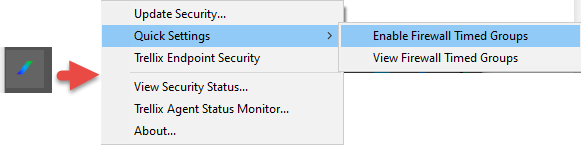
- Right-click Trellix in system tray → Enable Firewall Timed Groups.
- Right-click Trellix in system tray → Enable Firewall Timed Groups.
⚠️ 6. Unsupported Architecture
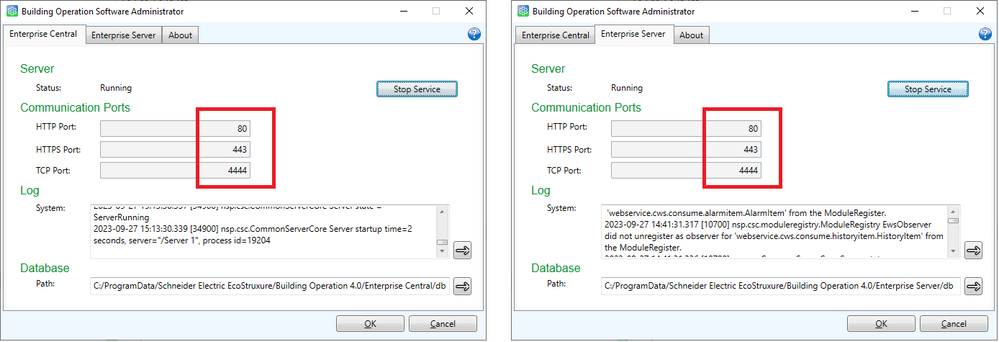
- Enterprise Central (EC) and Enterprise Server (ES) should not run on the same PC with default ports.
- If testing:
- Stop EC service or
- Reconfigure ports to avoid conflicts.
- If testing:
🔍 Additional Tips
- Use the Communication tab on each server to verify peer visibility.

