


Issue
When migrating a SmartX Controller (e.g., MP-C, MP-V, RP-C, IP-IO) from one Automation Server to another within the EcoStruxure Building Operation platform, you may encounter the following error:
The following devices appear to be hosted by another server. In order to host them, you must first right click the device and select "Clear host information"
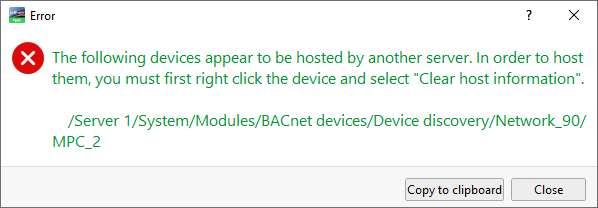
This happens because SmartX devices are designed to be hosted by only one Automation Server at a time.
Product Line
EcoStruxure Building Operation
Environment
- EcoStruxure Building Operation Automation Server (AS-B, AS-P)
- Multi-purpose Controllers (MP-C, MP-V)
- Room Controllers (RP-C)
- IP-IO Modules
Cause
SmartX Controllers maintain persistent host binding metadata. When a controller is discovered by a new Automation Server, it checks for existing host assignments. If the controller is still linked to a previous Automation Server, the system prevents reassignment to avoid conflicts in device management and communication.
Resolution
-
1. Open Device Discovery
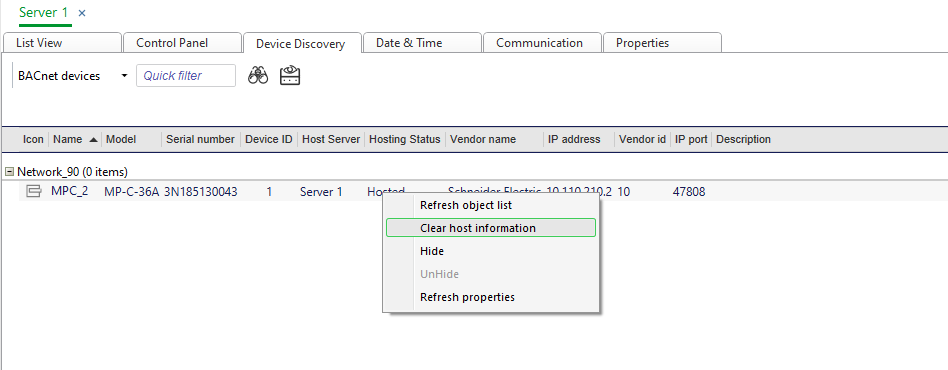
- In WorkStation, navigate to the Device Discovery tab of the target Automation Server.
2. Locate the SmartX Controller
- Initiate a BACnet device scan.
- The controller will appear flagged as hosted by another server.
3. Clear Host Information
- Right-click the detected controller.
- Select “Clear Host Information” from the context menu.
- This removes the previous host binding.
4. Re-host the Controller
- Add the controller to the new Automation Server’s configuration tree.
- Proceed with commissioning as usual.
Best Practices
- Always ensure the previous Automation Server is offline or has released the controller before reassignment.
- Use consistent naming conventions and documentation to track controller assignments.
- Perform backups before making host changes to preserve configuration integrity.

