
Ask our Experts
Didn't find what you are looking for? Ask our experts!
Share Your Feedback – Help Us Improve Search on Community! Please take a few minutes to participate in our Search Feedback Survey. Your insights will help us deliver the results you need faster and more accurately. Click here to take the survey
Schneider Electric support forum about Power Meters (ION, PowerTag, PowerLogic) and Power Quality from design, implementation to troubleshooting and more.
Search in
Link copied. Please paste this link to share this article on your social media post.
Posted: 2019-08-02 09:14 AM
Link copied. Please paste this link to share this article on your social media post.
Hi,
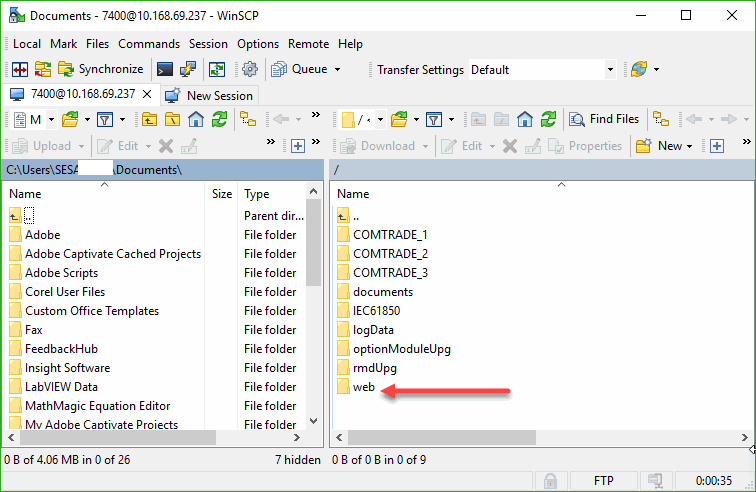
This error indicates that there are no webpages loaded to the meter. You'll need to upload the webpages to the meter using FTP (see image). Hope this helps.
Link copied. Please paste this link to share this article on your social media post.
Hello Swil,
Going to guess the meter was upgraded to V2.1 firmware. During this upgrade the existing web pages can be removed, and if the new web pages are unsuccessful to get loaded, the meter will appear as you described. In ION Setup it is possible to load just the web pages, or you can FTP as mentioned already.
Posted: 2019-08-02 09:14 AM
Link copied. Please paste this link to share this article on your social media post.
Hello Swil,
Going to guess the meter was upgraded to V2.1 firmware. During this upgrade the existing web pages can be removed, and if the new web pages are unsuccessful to get loaded, the meter will appear as you described. In ION Setup it is possible to load just the web pages, or you can FTP as mentioned already.
You’ve reached the end of your document
Create your free account or log in to subscribe to the board - and gain access to more than 10,000+ support articles along with insights from experts and peers.