

Share Your Feedback – Help Us Improve Search on Community! Please take a few minutes to participate in our Search Feedback Survey. Your insights will help us deliver the results you need faster and more accurately. Click here to take the survey
Access vast amounts of technical know-how and pro tips from our community of Geo SCADA experts.
Search in
Link copied. Please paste this link to share this article on your social media post.
Originally published on Geo SCADA Knowledge Base by Anonymous user | June 09, 2021 05:34 PM
A ClearSCADA driver can be stopped, started or restarted by using System Command. The format of the system command is following:
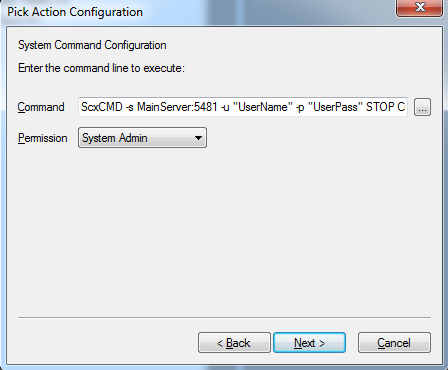
ScxCMD -s MainServer:5481 -u "UserName" -p "UserPass" STOP CrystalReports
MainServer needs to be replaced by the IP Address or Name of the Main server. _UserName_ and UserPass need to be replaced by the user name and user password respectively. In addition, replace "_STOP_" by "_START_" or "_RESTART_" to start or restart the driver.
Below is an example of stopping the Crystal Reports driver from a Pick Action. pic1.pngpic1.png
The ClearSCADA user specified requires system administrator permissions on the root group to be successful.
Whilst the SCXCMD process is executing the full command line may be accessible to other users on the machine via Task Manager and similar tools, this could potentially expose a system administrator's ClearSCADA credentials to unauthorised users.
Schneider Electric recommends a risk assessment of this behaviour is performed so that any necessary measures are implemented to protect the credentials, both whilst the credentials are stored ready to be executed and during execution.
Go: Home Back
Link copied. Please paste this link to share this article on your social media post.
Create your free account or log in to subscribe to the board - and gain access to more than 10,000+ support articles along with insights from experts and peers.