


Ask our Experts
Didn't find what you are looking for? Ask our experts!
Share Your Feedback – Help Us Improve Search on Community! Please take a few minutes to participate in our Search Feedback Survey. Your insights will help us deliver the results you need faster and more accurately. Click here to take the survey
Schneider Electric support forum about installation and configuration for DCIM including EcoStruxure IT Expert, IT Advisor, Data Center Expert, and NetBotz
Search in
Link copied. Please paste this link to share this article on your social media post.
Posted: 2020-07-02 10:28 AM . Last Modified: 2024-04-10 12:52 AM
When I try to access Portal the result is a website totaly diferent, with icons unaccessible, I cant do nothing on page (see picture)
I already did :
- I checked services and all is ok
- Did some tests in other computers and browsers
- Reset the VM server Portal
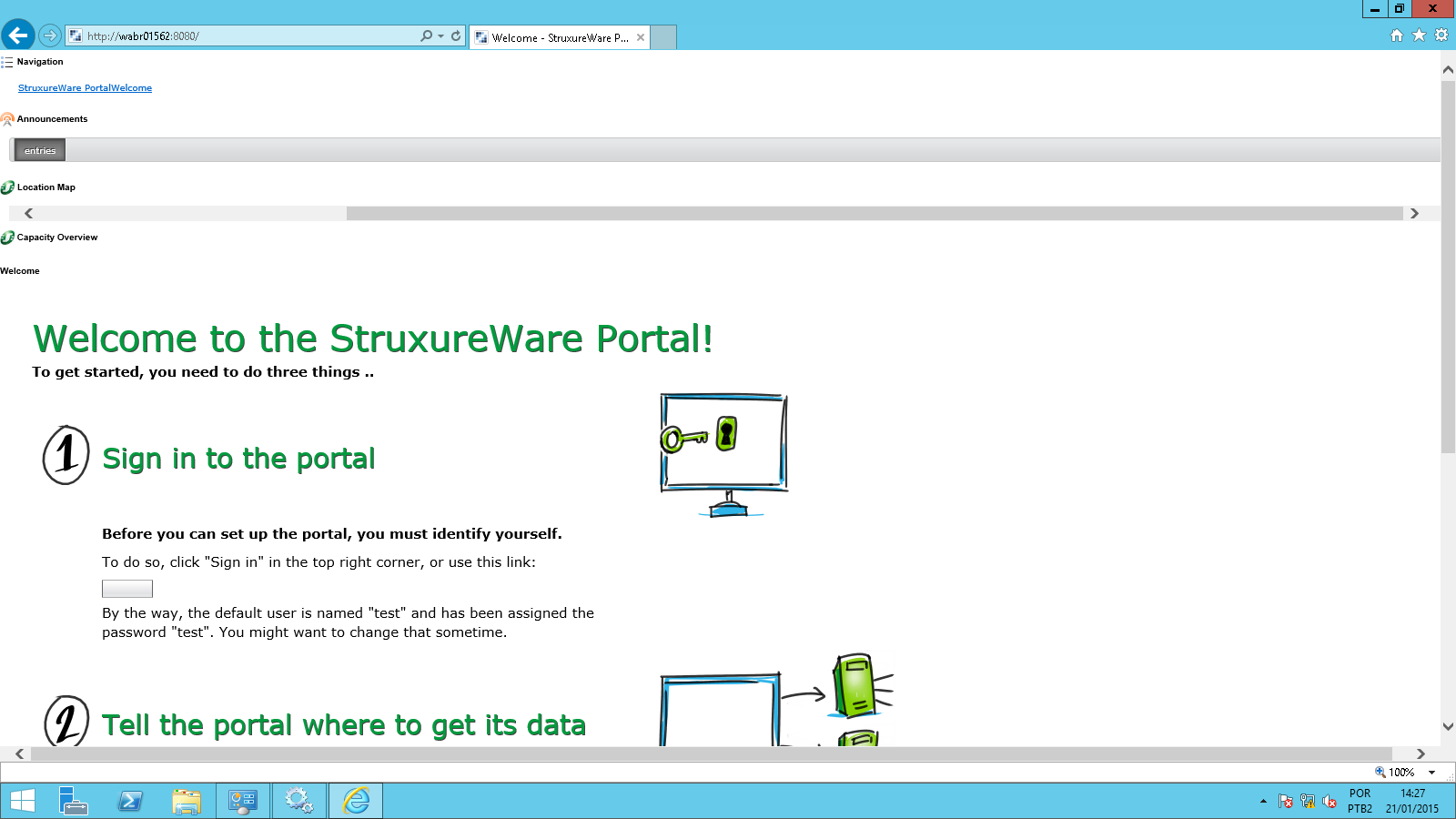
(CID:93914990)
Link copied. Please paste this link to share this article on your social media post.
Link copied. Please paste this link to share this article on your social media post.
Posted: 2020-07-02 10:29 AM . Last Modified: 2024-04-10 12:52 AM
Hi Fabio, we will investigate it, thanks for posting.
(CID:93915072)
Link copied. Please paste this link to share this article on your social media post.
Link copied. Please paste this link to share this article on your social media post.
Posted: 2020-07-02 10:29 AM . Last Modified: 2024-04-10 12:52 AM
I would recommend (if possible) trying a different browser like e.g. Chrome. Not sure if that has been tried already?
When using Internet Explorer I have experienced that disabling Compatibility View makes the site render correctly.
(CID:93915075)
Link copied. Please paste this link to share this article on your social media post.

Link copied. Please paste this link to share this article on your social media post.
Posted: 2020-07-02 10:29 AM . Last Modified: 2024-04-10 12:52 AM
Also trying to do a hard refresh of the page CTRL+F5 (CMD+R) would be an option. I would also make sure the Struxureware portal service is running. Some more information can be found here: http://dcimsupport.apc.com/display/Portal/Troubleshooting+StruxureWare+Portal+issues
(CID:93915134)
Link copied. Please paste this link to share this article on your social media post.
Link copied. Please paste this link to share this article on your social media post.
Posted: 2020-07-02 10:29 AM . Last Modified: 2024-04-10 12:52 AM
Ok, Tks ....do you have any response for this issue ?
(CID:93915131)
Link copied. Please paste this link to share this article on your social media post.
Link copied. Please paste this link to share this article on your social media post.
Posted: 2020-07-02 10:29 AM . Last Modified: 2023-10-31 11:45 PM

This question is closed for comments. You're welcome to start a new topic if you have further comments on this issue.
Link copied. Please paste this link to share this article on your social media post.

You’ve reached the end of your document

Create your free account or log in to subscribe to the board - and gain access to more than 10,000+ support articles along with insights from experts and peers.
