



Ask our Experts
Didn't find what you are looking for? Ask our experts!
Share Your Feedback – Help Us Improve Search on Community! Please take a few minutes to participate in our Search Feedback Survey. Your insights will help us deliver the results you need faster and more accurately. Click here to take the survey
Schneider Electric support forum about installation and configuration for DCIM including EcoStruxure IT Expert, IT Advisor, Data Center Expert, and NetBotz
Search in
Link copied. Please paste this link to share this article on your social media post.
Posted: 2020-07-03 05:39 AM . Last Modified: 2024-04-08 11:16 PM
Video Knowledge Base: http://www.schneider-electric.us/en/faqs/FA297815/
1) Log into the StruxureWare Data Center Expert Client.
2) Ensure that the NetBotz Appliance with the Attached camera is showing within StruxureWare Data Center Expert. If it has not been discovered yet, please reference FA177081.
3) Each NetBotz Camera requires one Surveillance license. You can verify the licensing that you have installed by: System Menu > Server Administration Settings > License Keys. There will be a specific License Type of StruxureWare Data Center Expert Surveillance Pack along with a node count and used node count for that license.
4) Select the Surveillance perspective.

5) Right click on one of the camera thumbnails and select Surveillance Settings. *TIP: You can select multiple thumbnails by CTRL+click or SHIFT+click on the camera images.
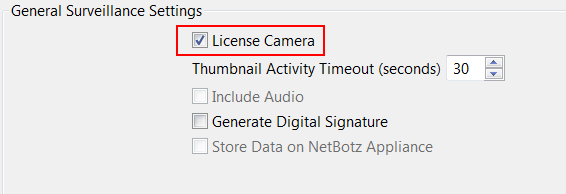
6) Mark the check box for License Camera.

7) Enter the StruxureWare Data Center Expert Server's IP address and configure the security, if the appliance was discovered using SSL or if the NetBotz can only communicate using SSL.

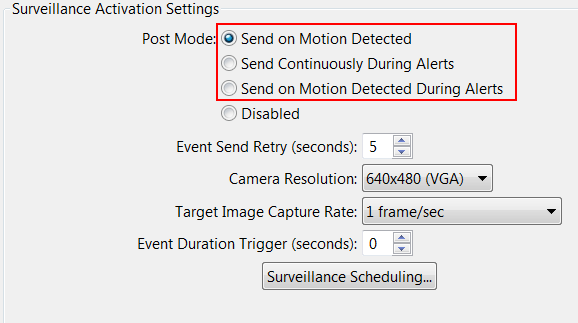
😎 Select the Post Mode that you would like to record the Surveillance clips for. There are other options to configure, if deemed necessary.

9) Select Apply and OK.
(CID:108235368)
Link copied. Please paste this link to share this article on your social media post.
Posted: 2020-07-03 05:39 AM . Last Modified: 2023-10-31 10:23 PM
This question is closed for comments. You're welcome to start a new topic if you have further comments on this issue.
Link copied. Please paste this link to share this article on your social media post.
You’ve reached the end of your document
Create your free account or log in to subscribe to the board - and gain access to more than 10,000+ support articles along with insights from experts and peers.