
Send a co-worker an invite to the portal.Just enter their email address and we'll connect them to register. After joining, they will belong to the same company.
You have entered an invalid email address. Please re-enter the email address.
This co-worker has already been invited to the Exchange portal. Please invite another co-worker.
Please enter email address
Send InviteCancel
Invitation Sent
Your invitation was sent.Thanks for sharing Exchange with your co-worker.
The EcoStruxure IT Data Center Expert server uses a subscription license to enable the software.
If your subscription has expired or the node count exceeds the amount allowed by your subscription, purchase a subscription or amend your existing subscription on mySchneider Software Management, https://www.se.com/myschneider/software/licenses.
All device nodes including SNMP devices, Modbus devices, and NetBotz cameras for surveillance are included in the subscription node count. Separate licensing is not required.
DCE trial licenses including the Virtual Appliance trial license (AP94VMTRL) are for 5 nodes and expire after 90 days. A subscription license is then required.
AP9465 - DCE Basic server, supports up to 540 nodes (525 nodes + 15 cameras)
AP9470 - DCE Standard server, supports up to 2150 nodes (2025 nodes + 125 cameras)
AP9475 - DCE Enterprise server, supports up to 4275 nodes (4025 nodes + 250 cameras)s
For details about sizing your DCE server or VM, see the DCE sizing guide.
Some DCE features are not available in trial mode, once the subscription license expires, or when the number of monitored devices exceeds the subscription node count:
Camera clip retrieval and export Note: The server will continue to collect camera clip data.
Go to System > Server Administration Settings > License.
Click Update License.
Upload the response file you downloaded from mySchneider Software Management. Click OK.
License info
Server ID: The DCE server MAC address, used to associate the server with a DCE device in mySchneider Software Management.
Tip: Click the Copy button to easily capture the server ID.
Node Count: The number of nodes allowed by the DCE subscription license
Used Node Count: The number of nodes currently monitored by the DCE server
Expires On: The date the DCE server subscription license expires
Server administrators will receive an email at 90, 60, and 30 days before expiration and when the license expires.
Expired: Whether the DCE server subscription license is expired, Yes or No
Trial: Whether the DCE server subscription license is a 5-node, 90-day trial license, Yes or No.
Server administrators will receive an email prompt to obtain a subscription license.
Update License... : Upload the license response file from mySchneider Software Management to enable the DCE software with a new or amended subscription license. IMPORTANT: You must upload the response file within 30 days from the time it was generated.
DCE 8.3.0 and older
Apply the Data Center Expert node license keys that identify how many devices the server can monitor, and application license keys for the MODBUS TCP Output Module and the Surveillance feature. More information about DCE licenses is available on the DCE product page.
Number of supported nodes
AP9465 - DCE Basic server, supports up to 525 nodes
AP9470 - DCE Standard server, supports up to 2025 nodes
AP9475 - DCE Enterprise server, supports up to 4025 nodes
For details about sizing your DCE server or VM, see the DCE sizing guide.
Apply license keys
Log in to the Data Center Expert desktop client.
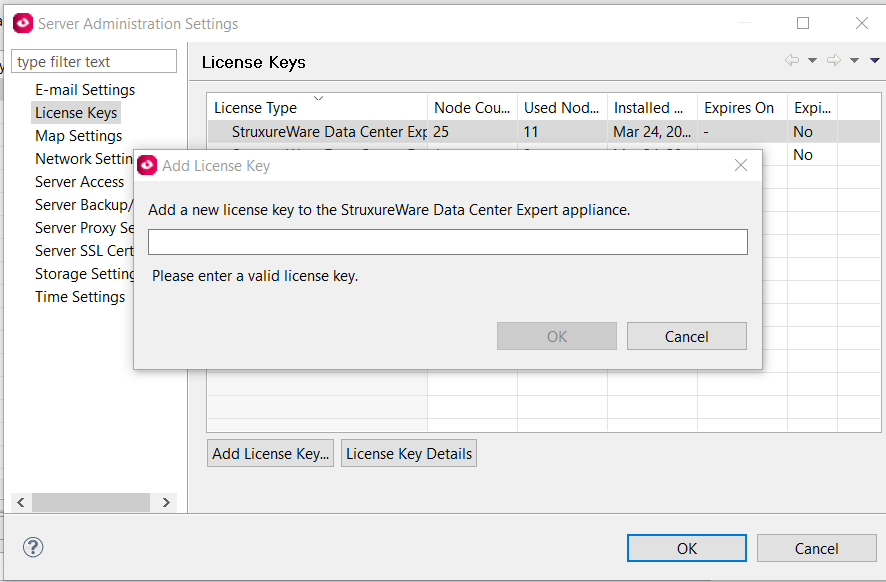
Go to System > Server Administration Settings > License Keys.
Click Add License Key...
Enter a license key and click OK.
DCE_add_license_keys_360039288573.png
License keys are listed by License Type, the number of devices each license allows the server to monitor (Node Count), and how many of those devices are being monitored (Used Node Count).
You can select a license key and click License Key Details to view information and copy it into a document:
License Type: Identifies the selected license by type. Node Count: The number of devices the license enables the server to monitor. Used Node Count: The number of monitored devices using the license. Installed On: The date the license was installed on the server. Expires On: The date the license will expire, if any. Expired: Whether or not the license has expired. License Key: The unique key associated with the license.