


Ask our Experts
Didn't find what you are looking for? Ask our experts!
Share Your Feedback – Help Us Improve Search on Community! Please take a few minutes to participate in our Search Feedback Survey. Your insights will help us deliver the results you need faster and more accurately. Click here to take the survey
Schneider Electric support forum about installation and configuration for DCIM including EcoStruxure IT Expert, IT Advisor, Data Center Expert, and NetBotz
Search in
Link copied. Please paste this link to share this article on your social media post.
Posted: 2020-07-03 12:48 PM . Last Modified: 2024-04-08 01:49 AM
Why the powernet421.mib can't be downloaded in the iReasoning MIB Browser v11 ?
I get this error now.
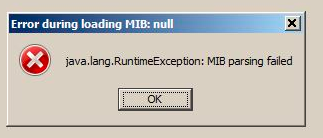
For information , previous powernet419.mib has the same problem. and the powernet409.mib works well.
Thank you for your answer.
Regards
(CID:111414158)
Link copied. Please paste this link to share this article on your social media post.
Link copied. Please paste this link to share this article on your social media post.
Posted: 2020-07-03 12:49 PM . Last Modified: 2024-04-08 01:49 AM
Hi Alain,
Does the MIB browser point to a specific line in the MIB? Anything more specific than a Java error? That is often a software issue. I have someone here running iReasoning version 10 build 3805 and there is no issue.
Steve
P.S.
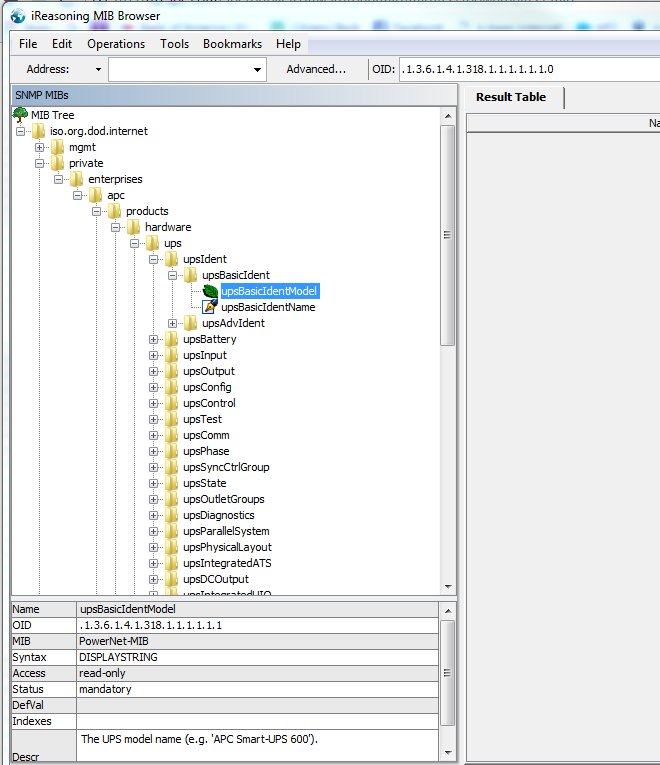
I downloaded the personal version of iReasoning version 11 and the powernet mib version 4.2.1. I get no error and I can see the APC OIDs:
(CID:111414167)
Link copied. Please paste this link to share this article on your social media post.
Link copied. Please paste this link to share this article on your social media post.
Posted: 2020-07-03 12:49 PM . Last Modified: 2024-04-08 01:49 AM
Hi Alain,
Does the MIB browser point to a specific line in the MIB? Anything more specific than a Java error? That is often a software issue. I have someone here running iReasoning version 10 build 3805 and there is no issue.
Steve
P.S.
I downloaded the personal version of iReasoning version 11 and the powernet mib version 4.2.1. I get no error and I can see the APC OIDs:
(CID:111414167)
Link copied. Please paste this link to share this article on your social media post.

Link copied. Please paste this link to share this article on your social media post.
Posted: 2020-07-03 12:49 PM . Last Modified: 2024-04-08 01:49 AM
Thank you Steven for your help. You gave me an idea.
It works well now because i have deleted in MIB Browser menu : tools/options all the previous powernet mib paths. and after i have reloaded the last MIB.
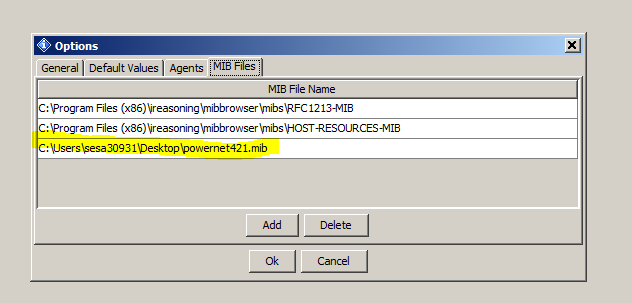
Thank again !!!! Alain
(CID:111414400)
Link copied. Please paste this link to share this article on your social media post.
Link copied. Please paste this link to share this article on your social media post.
Posted: 2020-07-03 12:49 PM . Last Modified: 2024-04-08 01:49 AM
Glad you figured it out!
(CID:111414688)
Link copied. Please paste this link to share this article on your social media post.
Link copied. Please paste this link to share this article on your social media post.
Posted: 2020-07-03 12:49 PM . Last Modified: 2023-10-22 04:22 AM

This question is closed for comments. You're welcome to start a new topic if you have further comments on this issue.
Link copied. Please paste this link to share this article on your social media post.

You’ve reached the end of your document

Create your free account or log in to subscribe to the board - and gain access to more than 10,000+ support articles along with insights from experts and peers.
