Help
  • Explore Community
  • Get Started
  • Ask the Community
  • How-To & Best Practices
  • Contact Support
Notifications
Login / Register
Schneider Electric
Community
Community
Notifications
close
  • Categories
  • Forums
  • Knowledge Center
  • Blogs
  • Ideas
  • Events & Webinars
Help
Help
  • Explore Community
  • Get Started
  • Ask the Community
  • How-To & Best Practices
  • Contact Support
Login / Register

Contact Support

Close

Ask our Experts

Have a question related to our products, solutions or services? Get quick support on community Forums

Email Us

For Community platform-related support, please email us

New Community Ranking System
Our Community ranking system has recently been updated. You may notice changes in user rankings and receive system messages or notifications. If you have questions about how the new ranking works, please refer to the announcement post for more details (click here).

StruxureWare Portal Customization - Portlets to Change Colours with Warning & Critical Alarms

EcoStruxure IT Forum

Schneider Electric support forum about installation and configuration for DCIM including EcoStruxure IT Expert, IT Advisor, Data Center Expert, and NetBotz

Search in

Improve your search experience:

  • Exact phrase → Use quotes " " (e.g., "error 404")
  • Wildcard → Use * for partial words (e.g., build*, *tion)
  • AND / OR → Combine keywords (e.g., login AND error, login OR sign‑in)
  • Keep it short → Use 2–3 relevant words , not full sentences
  • Filters → Narrow results by section (Knowledge Base, Users, Products)
cancel
Turn on suggestions
Auto-suggest helps you quickly narrow down your search results by suggesting possible matches as you type.
Showing results for 
Show  only  | Search instead for 
Did you mean: 

Select a Country

Please select a country to continue with beta search.

  • Home
  • Schneider Electric Community
  • EcoStruxure IT
  • EcoStruxure IT Forum
  • StruxureWare Portal Customization - Portlets to Change Colours with Warning & Critical Alarms
Options
  • Mark Topic as New
  • Mark Topic as Read
  • Float this Topic for Current User
  • Bookmark
  • Subscribe
  • Mute
  • Printer Friendly Page
Invite a Co-worker
Send a co-worker an invite to the portal.Just enter their email address and we'll connect them to register. After joining, they will belong to the same company.
You have entered an invalid email address. Please re-enter the email address.
This co-worker has already been invited to the Exchange portal. Please invite another co-worker.
Please enter email address
Send Invite Cancel
Invitation Sent
Your invitation was sent.Thanks for sharing Exchange with your co-worker.
Send New Invite Close
Top Experts
User Count
Cory_McDonald
Cory_McDonald Champion
159
Jef
Jef Leader
114
gsterling
gsterling Mentor
77
View All

Recommended Forums

  • APC UPS Data Center & Enterprise Solutions Forum

Invite a Colleague

Found this content useful? Share it with a Colleague!

Invite a Colleague Invite
Solved Go to Solution
Back to EcoStruxure IT Forum
Start a Topic
Solved
Angwenyi
Angwenyi
Explorer

Posted: ‎2020-06-21 04:49 AM . Last Modified: ‎2020-06-21 04:51 AM

0 Likes
4
3938
  • Mark as New
  • Bookmark
  • Subscribe
  • Mute
  • Permalink
  • Print
  • Email to a Friend
  • Report Inappropriate Content

Link copied. Please paste this link to share this article on your social media post.

Posted: ‎2020-06-21 04:49 AM . Last Modified: ‎2020-06-21 04:51 AM

StruxureWare Portal Customization - Portlets to Change Colours with Warning & Critical Alarms

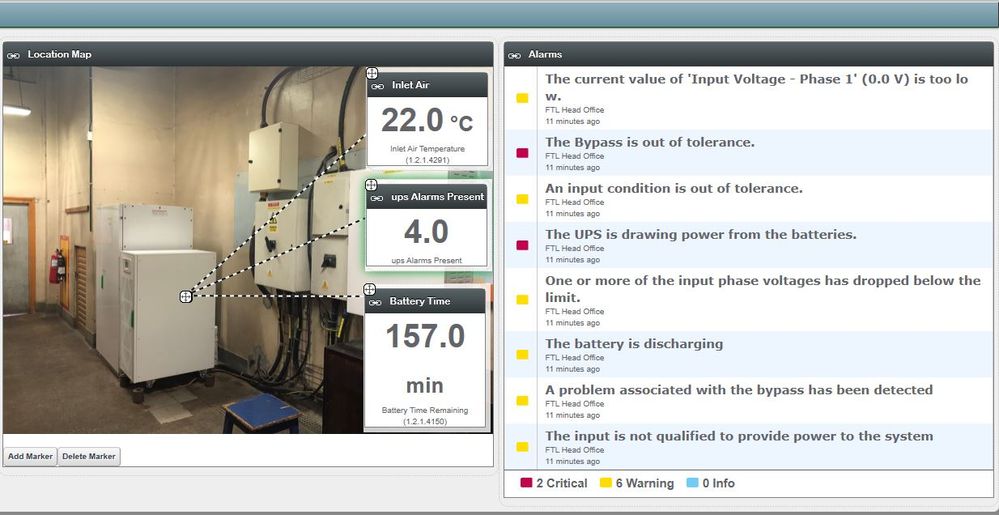
Portal.JPGHi Team,


Kindly I have a customer with on premises DCE and DCO, I have configured the dashboard using StruxureWare Portal but can get the portlets to change colours when there is an alarm as per the attached image.


How can I get the portlets to change colours whenever there is a warning and critical alarm especially the values displayed in the portlet.


Thank you.


Regards

Felix

Labels
  • Labels:
  • Data Center Expert
  • Data Center Operation
  • Portal
  • Tags:
  • english
Reply

Link copied. Please paste this link to share this article on your social media post.

  • All forum topics
  • Previous Topic
  • Next Topic

Accepted Solutions
Jef
Jef Leader
Leader

Posted: ‎2020-06-22 02:09 AM

0 Likes
3
3929
  • Mark as New
  • Bookmark
  • Subscribe
  • Mute
  • Permalink
  • Print
  • Email to a Friend
  • Report Inappropriate Content

Link copied. Please paste this link to share this article on your social media post.

Posted: ‎2020-06-22 02:09 AM

Hi Felix,

Sorry to disappoint, out of the box Portlets cannot be color coded (such feature had not been developed/included in the product).

Kind regards 

See Answer In Context

  • Tags:
  • english
Reply

Link copied. Please paste this link to share this article on your social media post.

Mahmoudd
Mahmoudd
Contributor

Posted: ‎2020-07-07 08:26 PM

In response to Angwenyi
0 Likes
0
3871
  • Mark as New
  • Bookmark
  • Subscribe
  • Mute
  • Permalink
  • Print
  • Email to a Friend
  • Report Inappropriate Content

Link copied. Please paste this link to share this article on your social media post.

Posted: ‎2020-07-07 08:26 PM


See Answer In Context

  • Tags:
  • english
Reply

Link copied. Please paste this link to share this article on your social media post.

gsterling
gsterling Mentor
Mentor

Posted: ‎2020-07-08 11:23 AM

In response to Angwenyi
0 Likes
0
3849
  • Mark as New
  • Bookmark
  • Subscribe
  • Mute
  • Permalink
  • Print
  • Email to a Friend
  • Report Inappropriate Content

Link copied. Please paste this link to share this article on your social media post.

Posted: ‎2020-07-08 11:23 AM

Hello Felix


The Struxureware Portal offer has been discontinued and will likely be replaced by alternative functionality, so you should not expect to see any future improvements to the current offer. The specifics regarding a replacement are not yet ready to be shared.


Regards


Greg Sterling

See Answer In Context

  • Tags:
  • english
Reply

Link copied. Please paste this link to share this article on your social media post.

Replies 4
Jef
Jef Leader
Leader

Posted: ‎2020-06-22 02:09 AM

0 Likes
3
3930
  • Mark as New
  • Bookmark
  • Subscribe
  • Mute
  • Permalink
  • Print
  • Email to a Friend
  • Report Inappropriate Content

Link copied. Please paste this link to share this article on your social media post.

Posted: ‎2020-06-22 02:09 AM

Hi Felix,

Sorry to disappoint, out of the box Portlets cannot be color coded (such feature had not been developed/included in the product).

Kind regards 

  • Tags:
  • english
Reply

Link copied. Please paste this link to share this article on your social media post.

Angwenyi
Angwenyi
Explorer

Posted: ‎2020-07-07 05:49 AM

In response to Jef
0 Likes
2
3877
  • Mark as New
  • Bookmark
  • Subscribe
  • Mute
  • Permalink
  • Print
  • Email to a Friend
  • Report Inappropriate Content

Link copied. Please paste this link to share this article on your social media post.

Posted: ‎2020-07-07 05:49 AM

Hi Jef,


Thank you for your reply, any chance this feature could be included in future?


Regards,

Felix

  • Tags:
  • english
Reply

Link copied. Please paste this link to share this article on your social media post.

Mahmoudd
Mahmoudd
Contributor

Posted: ‎2020-07-07 08:26 PM

In response to Angwenyi
0 Likes
0
3872
  • Mark as New
  • Bookmark
  • Subscribe
  • Mute
  • Permalink
  • Print
  • Email to a Friend
  • Report Inappropriate Content

Link copied. Please paste this link to share this article on your social media post.

Posted: ‎2020-07-07 08:26 PM

 
  • Tags:
  • english
Reply

Link copied. Please paste this link to share this article on your social media post.

gsterling
gsterling Mentor
Mentor

Posted: ‎2020-07-08 11:23 AM

In response to Angwenyi
0 Likes
0
3850
  • Mark as New
  • Bookmark
  • Subscribe
  • Mute
  • Permalink
  • Print
  • Email to a Friend
  • Report Inappropriate Content

Link copied. Please paste this link to share this article on your social media post.

Posted: ‎2020-07-08 11:23 AM

Hello Felix


The Struxureware Portal offer has been discontinued and will likely be replaced by alternative functionality, so you should not expect to see any future improvements to the current offer. The specifics regarding a replacement are not yet ready to be shared.


Regards


Greg Sterling

  • Tags:
  • english
Reply

Link copied. Please paste this link to share this article on your social media post.

Preview Exit Preview

never-displayed

You must be signed in to add attachments

never-displayed


You’ve reached the end of your document

WHAT’S NEXT?

Ask our Experts

Didn't find what you are looking for? Ask our experts!

My Dashboard

Check out the new Feeds and activities that are relevant to you.

To The Top!

Forums

  • APC UPS Data Center Backup Solutions
  • EcoStruxure IT
  • EcoStruxure Geo SCADA Expert
  • Metering & Power Quality
  • Schneider Electric Wiser

Knowledge Center

Events & webinars

Ideas

Blogs

Get Started

  • Ask the Community
  • Community Guidelines
  • Community User Guide
  • How-To & Best Practice
  • Experts Leaderboard
  • Contact Support

    Ask our Experts

    Have a question related to our products, solutions or services? Get quick support on community Forums

    Email Us

    For Community platform-related support, please email us

Subscribing is a smart move!
You can subscribe to this board after you log in or create your free account.
Forum-Icon

Create your free account or log in to subscribe to the board - and gain access to more than 10,000+ support articles along with insights from experts and peers.

Register today for FREE

Register Now

Already have an account? Login

Terms & Conditions Privacy Notice Change your Cookie Settings © 2026 Schneider Electric

Welcome!

Welcome to your new personalized space.

of

Explore