


Ask our Experts
Didn't find what you are looking for? Ask our experts!
Share Your Feedback – Help Us Improve Search on Community! Please take a few minutes to participate in our Search Feedback Survey. Your insights will help us deliver the results you need faster and more accurately. Click here to take the survey
Schneider Electric support forum about installation and configuration for DCIM including EcoStruxure IT Expert, IT Advisor, Data Center Expert, and NetBotz
Search in
Link copied. Please paste this link to share this article on your social media post.
Posted: 2020-07-03 10:23 AM . Last Modified: 2024-04-08 02:34 AM
Hi all!
My question: at the StruxureOn GW 1.0.2.9 web-interface there is a backup option, but for some reason there is no restore option from a backup copy :-/. How it is possible to use already created backup copy for restore StruxureOn GW server?
Very thanks for the support.
(CID:110790577)
Link copied. Please paste this link to share this article on your social media post.
Link copied. Please paste this link to share this article on your social media post.
Posted: 2020-07-03 10:23 AM . Last Modified: 2024-04-08 02:34 AM
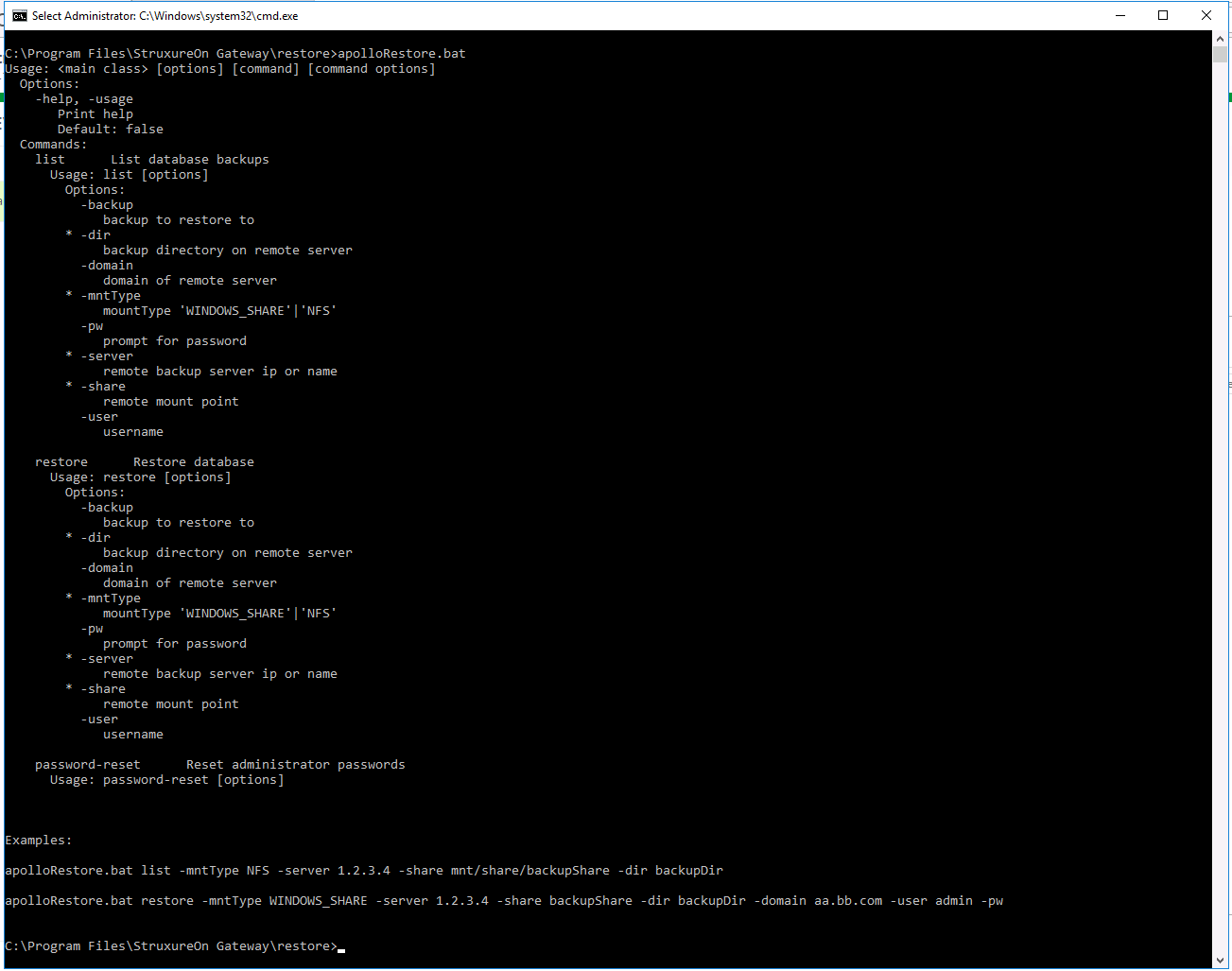
While backups are performed through the StruxureOn Gateway UI, the restore functionality happens outside of the product via a CLI tool run from a Windows command prompt.
If you browse your Gateway server and look in the Gateway install path (Default path is: C:\Program Files\StruxureOn Gateway) you will find a directory called restore. This is where the Gateway restore utilities reside.
To restore from a previously created backup:
(CID:111414635)
Link copied. Please paste this link to share this article on your social media post.
Link copied. Please paste this link to share this article on your social media post.
Posted: 2020-07-03 10:23 AM . Last Modified: 2024-04-08 02:34 AM
Hi spezialist, thanks for posting. Lets see who can be of assistance here. @community any ideas?
Kind regards Ditte
(CID:110791525)
Link copied. Please paste this link to share this article on your social media post.
Link copied. Please paste this link to share this article on your social media post.
Posted: 2020-07-03 10:23 AM . Last Modified: 2024-04-08 02:34 AM
While backups are performed through the StruxureOn Gateway UI, the restore functionality happens outside of the product via a CLI tool run from a Windows command prompt.
If you browse your Gateway server and look in the Gateway install path (Default path is: C:\Program Files\StruxureOn Gateway) you will find a directory called restore. This is where the Gateway restore utilities reside.
To restore from a previously created backup:
(CID:111414635)
Link copied. Please paste this link to share this article on your social media post.

Link copied. Please paste this link to share this article on your social media post.
Posted: 2020-07-03 10:23 AM . Last Modified: 2024-04-08 02:34 AM
Hi Derek Robson,
Very thanks for the detailed and good answer. I will surely try it in practice.
Thanks.
(CID:111414656)
Link copied. Please paste this link to share this article on your social media post.
Link copied. Please paste this link to share this article on your social media post.
Posted: 2020-07-03 10:23 AM . Last Modified: 2023-10-22 02:34 AM

This question is closed for comments. You're welcome to start a new topic if you have further comments on this issue.
Link copied. Please paste this link to share this article on your social media post.

You’ve reached the end of your document

Create your free account or log in to subscribe to the board - and gain access to more than 10,000+ support articles along with insights from experts and peers.
