


Ask our Experts
Didn't find what you are looking for? Ask our experts!
Share Your Feedback – Help Us Improve Search on Community! Please take a few minutes to participate in our Search Feedback Survey. Your insights will help us deliver the results you need faster and more accurately. Click here to take the survey
Schneider Electric support forum about installation and configuration for DCIM including EcoStruxure IT Expert, IT Advisor, Data Center Expert, and NetBotz
Search in
Link copied. Please paste this link to share this article on your social media post.
Posted: 2020-07-03 03:20 PM . Last Modified: 2024-04-08 01:00 AM
Hello,
I want to change label of a device but I counld't find it in Data Center Expert.
I also couldn't find it directly from device by connecting its IP adress from web browser.
Devices are Servertech(CS-30VEKD25D8) and Raritan(PX2-1493) PDU.
As you can see, some of servertech devices' label are changed.
Any suggestions?
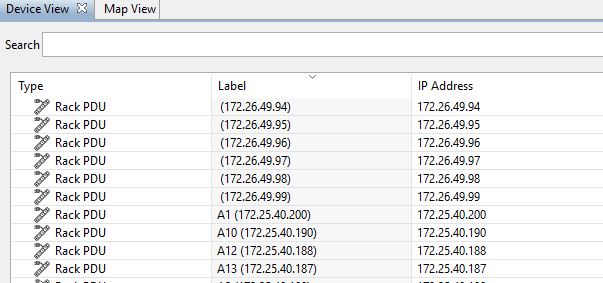
(CID:116922008)
Link copied. Please paste this link to share this article on your social media post.
Link copied. Please paste this link to share this article on your social media post.
Posted: 2020-07-03 03:20 PM . Last Modified: 2024-04-08 01:00 AM
Erhyan,
You can update (change) the device label by editing the SNMP settings within the devices via its web browser interface IE for the Raritan devices it is found under "Device Settings" then "Network Services" then "SNMP" there you will find you can set the sysContact, sysName & sysLocation. The sysName is the "label"
I would assume the Servertech devices will be basically the same but since I do not have any I can give you the exact path to find where you can edit the SNMP settings.
Best regards
Mike.
(CID:116922020)
Link copied. Please paste this link to share this article on your social media post.
Link copied. Please paste this link to share this article on your social media post.
Posted: 2020-07-03 03:20 PM . Last Modified: 2024-04-08 01:00 AM
Erhyan,
You can update (change) the device label by editing the SNMP settings within the devices via its web browser interface IE for the Raritan devices it is found under "Device Settings" then "Network Services" then "SNMP" there you will find you can set the sysContact, sysName & sysLocation. The sysName is the "label"
I would assume the Servertech devices will be basically the same but since I do not have any I can give you the exact path to find where you can edit the SNMP settings.
Best regards
Mike.
(CID:116922020)
Link copied. Please paste this link to share this article on your social media post.

Link copied. Please paste this link to share this article on your social media post.
Posted: 2020-07-03 03:20 PM . Last Modified: 2024-04-08 01:00 AM
Hello Mike,
Thanks for the response. It worked.
Best regards,
Erhan
(CID:116922348)
Link copied. Please paste this link to share this article on your social media post.
Link copied. Please paste this link to share this article on your social media post.
Posted: 2020-07-03 03:20 PM . Last Modified: 2024-04-08 01:00 AM
Your most welcome and glad to help!
(CID:116922367)
Link copied. Please paste this link to share this article on your social media post.
Link copied. Please paste this link to share this article on your social media post.
Posted: 2020-07-03 03:20 PM . Last Modified: 2023-10-22 02:24 AM

This question is closed for comments. You're welcome to start a new topic if you have further comments on this issue.
Link copied. Please paste this link to share this article on your social media post.

You’ve reached the end of your document

Create your free account or log in to subscribe to the board - and gain access to more than 10,000+ support articles along with insights from experts and peers.
