


Ask our Experts
Didn't find what you are looking for? Ask our experts!
Share Your Feedback – Help Us Improve Search on Community! Please take a few minutes to participate in our Search Feedback Survey. Your insights will help us deliver the results you need faster and more accurately. Click here to take the survey
Schneider Electric support forum about installation and configuration for DCIM including EcoStruxure IT Expert, IT Advisor, Data Center Expert, and NetBotz
Search in
Link copied. Please paste this link to share this article on your social media post.
Posted: 2020-07-06 12:46 AM . Last Modified: 2024-04-02 11:26 PM
I have a DCO-VM that has run out of disk space, can I add more disk but how does it extend, or is only disk added?
Your help please.
Regards
Caroll
(CID:153552986)
Link copied. Please paste this link to share this article on your social media post.
Link copied. Please paste this link to share this article on your social media post.
Posted: 2020-07-06 12:46 AM . Last Modified: 2024-04-02 11:26 PM
Dear Caroll Silva,
There are two ways to extend the disk space of DCO and EcoStruxute IT Advisor.
The first method is fast and very flexible, but requires excellent knowledge of the internals of the Linux OS (RHEL/CentOS). Therefore, if you are not like this or you do not have your own Linux system administrators in the organisation, then this method is not suitable for you. Personally, I use this method, since for many years I have been an AIX/Linux administrator.
The second method is the official method, which, for example, was described by Jef Faridi in post :
Manually deleting the system/database files should be avoided, you might risk loosing the data. I would basically suggest the following option, that may give you a reliable setup:
1- Save the current backup files (usually located in the folder /data/backup) somewhere safe (such as network drive)
2- Make a clean/fresh installation (at least 100 GB disc space would be recommended, see System requirements)
3- and then restore the latest completed backup file.
(note: due to disk space issue, some of the latest backup file(s) might be incomplete - check the file size, incomplete backups might be smaller in size).
If you have more questions, please ask.
With respect.
(CID:153553040)
Link copied. Please paste this link to share this article on your social media post.
Link copied. Please paste this link to share this article on your social media post.
Posted: 2020-07-06 12:46 AM . Last Modified: 2024-04-02 11:26 PM
If I remember correctly you can either extend the volume or add a new one in vsphere and then reboot the appliance for the appliance to detect it.
(CID:153553004)
Link copied. Please paste this link to share this article on your social media post.

Link copied. Please paste this link to share this article on your social media post.
Posted: 2020-07-06 12:46 AM . Last Modified: 2024-04-02 11:26 PM
That is for DCE.
(CID:153553082)
Link copied. Please paste this link to share this article on your social media post.
Link copied. Please paste this link to share this article on your social media post.
Posted: 2020-07-06 12:46 AM . Last Modified: 2024-04-02 11:26 PM
Thanks for clarifying.
(CID:153945163)
Link copied. Please paste this link to share this article on your social media post.
Link copied. Please paste this link to share this article on your social media post.
Posted: 2020-07-06 12:46 AM . Last Modified: 2024-04-02 11:26 PM
Dear Caroll Silva,
There are two ways to extend the disk space of DCO and EcoStruxute IT Advisor.
The first method is fast and very flexible, but requires excellent knowledge of the internals of the Linux OS (RHEL/CentOS). Therefore, if you are not like this or you do not have your own Linux system administrators in the organisation, then this method is not suitable for you. Personally, I use this method, since for many years I have been an AIX/Linux administrator.
The second method is the official method, which, for example, was described by Jef Faridi in post :
Manually deleting the system/database files should be avoided, you might risk loosing the data. I would basically suggest the following option, that may give you a reliable setup:
1- Save the current backup files (usually located in the folder /data/backup) somewhere safe (such as network drive)
2- Make a clean/fresh installation (at least 100 GB disc space would be recommended, see System requirements)
3- and then restore the latest completed backup file.
(note: due to disk space issue, some of the latest backup file(s) might be incomplete - check the file size, incomplete backups might be smaller in size).
If you have more questions, please ask.
With respect.
(CID:153553040)
Link copied. Please paste this link to share this article on your social media post.
Link copied. Please paste this link to share this article on your social media post.
Posted: 2020-07-06 12:47 AM . Last Modified: 2024-04-02 11:26 PM
Thank you for your response, regarding this issue we have another question; Initially 200 GB of disk was allocated, the database it accumulates is 10.48 GB and is in use 150 GB, please indicate what the disk is accumulating.
thanks
(CID:153553372)
Link copied. Please paste this link to share this article on your social media post.
Link copied. Please paste this link to share this article on your social media post.
Posted: 2020-07-06 12:47 AM . Last Modified: 2024-04-02 11:26 PM
Dear Caroll Silva,
To begin with, if you have access to the webmin interface of your DCO-server, please show a screenshot of Disk and Network Filesystems.
With respect.
(CID:153553385)
Link copied. Please paste this link to share this article on your social media post.
Link copied. Please paste this link to share this article on your social media post.
Posted: 2020-07-06 12:47 AM . Last Modified: 2024-04-02 11:26 PM
attached as requested
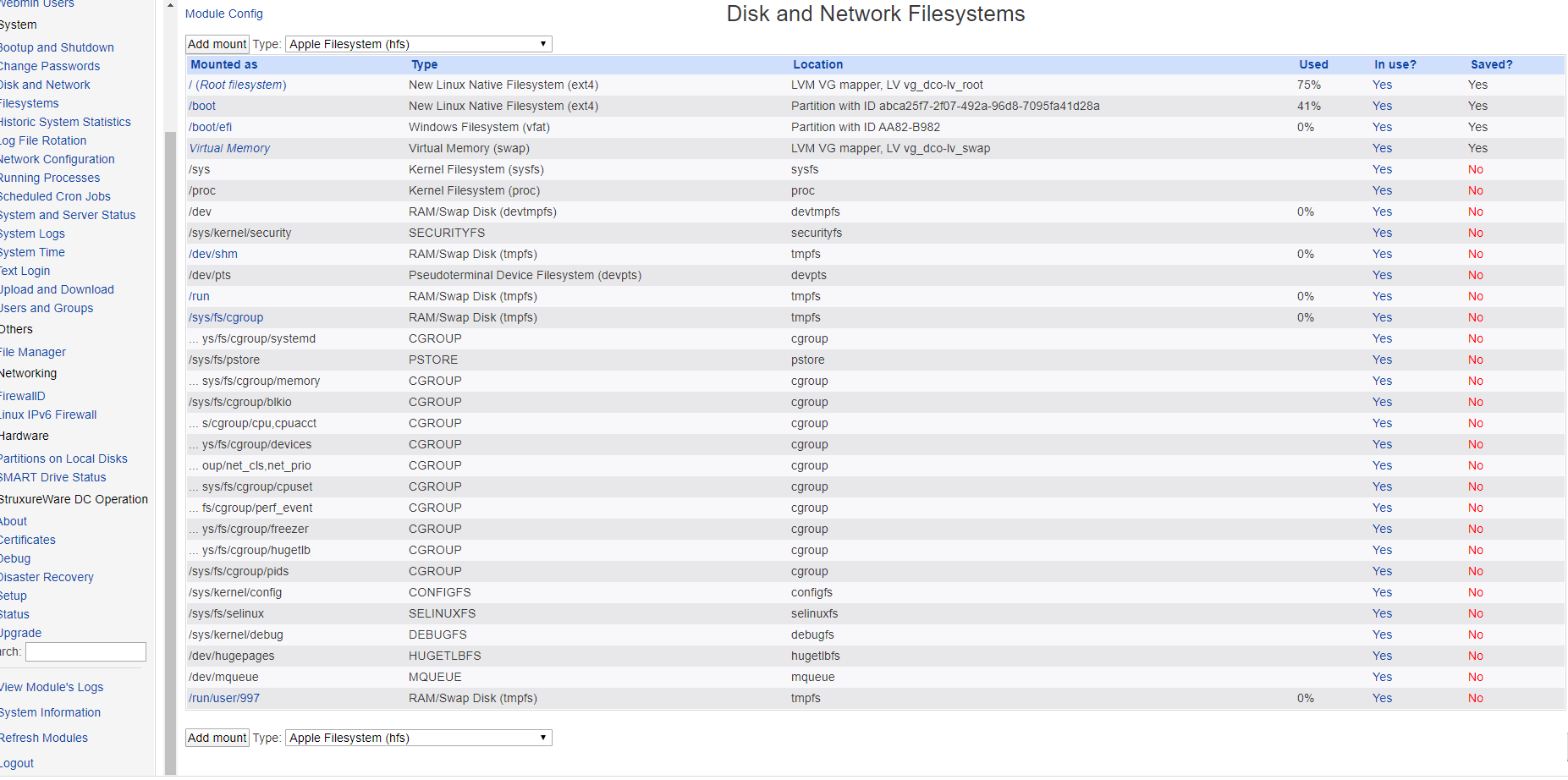
(CID:153553905)
Link copied. Please paste this link to share this article on your social media post.
Link copied. Please paste this link to share this article on your social media post.
Posted: 2020-07-06 12:47 AM . Last Modified: 2024-04-02 11:26 PM
Please check the contents of the following folder as its a common reason customers see their partition fill up.
/data/backup
If you see a lot of backup files in this folder, make sure you have set backups to be cleaned up on a schedule per this page: https://sxwhelpcenter.ecostruxureit.com/display/UADCO8x/Backing+up+and+restoring+backup
Cleaning up old backupsIn Webclient Administration > Backup and Restore > Backup Settings, you can configure cleanup frequency of old backups.
Also, check for old / large log files in:
/opt/jboss-as/standalone/log
Existence of log files in this folder is normal, rotated versions will have a .gz file extension. The .gz files can be purged if space is needed.
Regards
Greg Sterling
(CID:153554010)
Link copied. Please paste this link to share this article on your social media post.
Link copied. Please paste this link to share this article on your social media post.
Posted: 2020-07-06 12:47 AM . Last Modified: 2024-04-02 11:26 PM
Dear Caroll Silva,
Greg Sterling is right, judging from your Webmin screenshot you need to first check the directory with backups (their number and size):
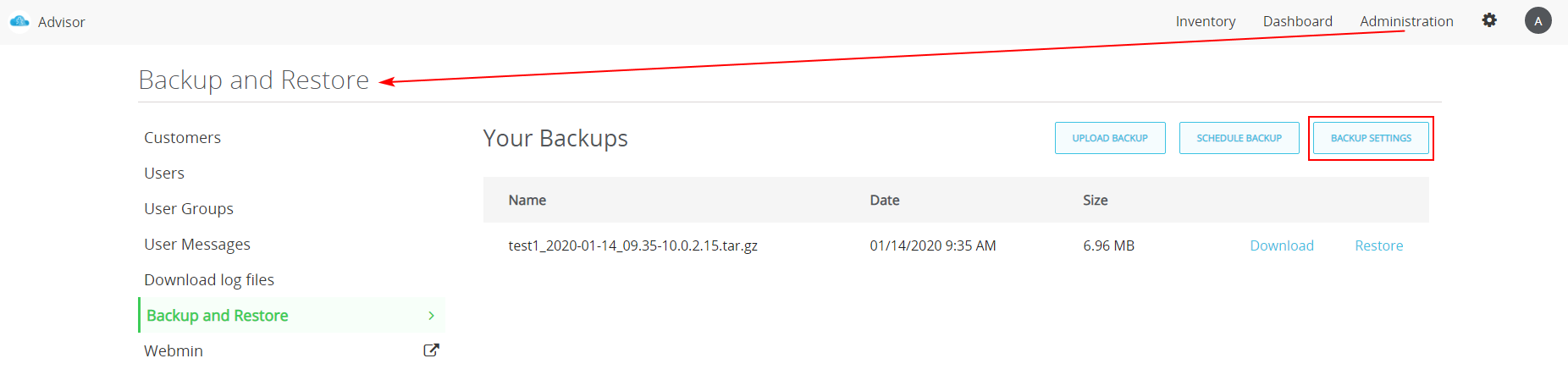
and
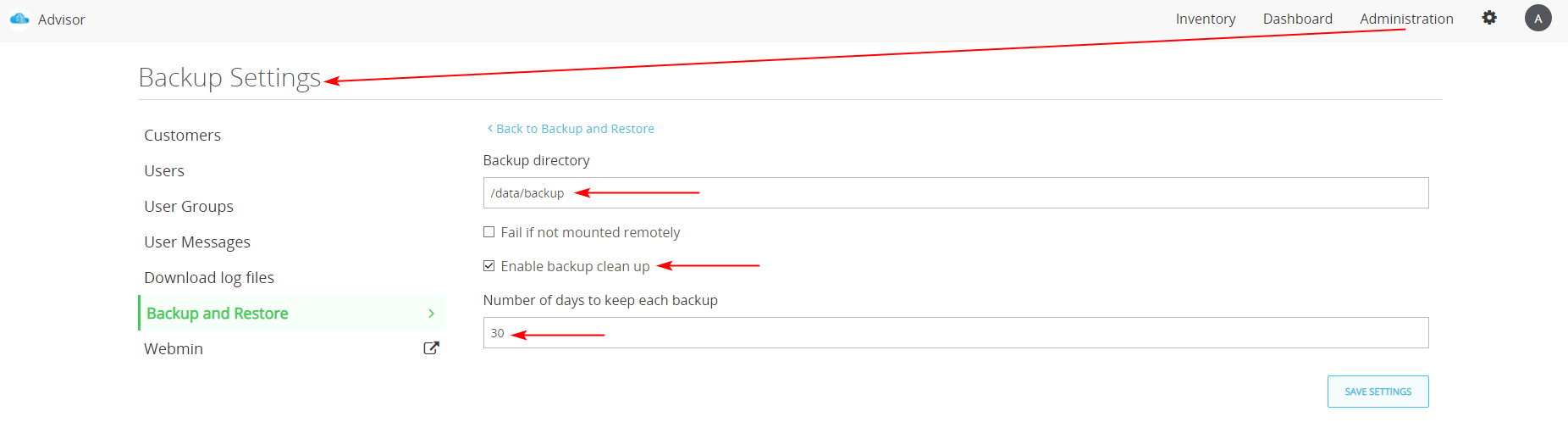
With respect.
(CID:153554219)
Link copied. Please paste this link to share this article on your social media post.
Link copied. Please paste this link to share this article on your social media post.
Posted: 2020-07-06 12:47 AM . Last Modified: 2024-04-02 11:26 PM
Thanks for your advisory, we have managed to use the first method of expanding the disk successfully.
regards
(CID:153944292)
Link copied. Please paste this link to share this article on your social media post.
Link copied. Please paste this link to share this article on your social media post.
Posted: 2020-07-06 12:47 AM . Last Modified: 2024-04-02 11:26 PM
Ok, very thanks for the good feedback 😀.
(CID:153944410)
Link copied. Please paste this link to share this article on your social media post.
Link copied. Please paste this link to share this article on your social media post.
Posted: 2020-07-06 12:47 AM . Last Modified: 2023-10-22 02:04 AM

This question is closed for comments. You're welcome to start a new topic if you have further comments on this issue.
Link copied. Please paste this link to share this article on your social media post.

You’ve reached the end of your document

Create your free account or log in to subscribe to the board - and gain access to more than 10,000+ support articles along with insights from experts and peers.
