Issue
User account not associated with a groupThe Workstation Error when trying to login is: User account not associated with a group.

Error(s) message in ES trace log may include:
WinES\server\nsp_servers\csc\accountaccess\source\AccountAccess.cpp(486)
Workstation Error: User_Not_Associated_With_A_Group (0xc002a)
in module Account_Access(28).
Product Line
EcoStruxure Building Operation
Environment
Building Operation Enterprise Server
Cause
The Windows AD integration performance in EBO was improved since version 2022 by storing and comparing the SID for the AD-groups. During the upgrade from version 3.2.3 to EBO 2022 all EBO groups should have been updated with an AD-connected group SID. This was not done as the AD server was offline when doing the upgrade of the ES.
Resolution
To enable the legacy method of matching groups during logon, configure the following property:
Steps:
- Open the
ES.propertiesfile, typically located at:C:\Program Files (x86)\Schneider Electric EcoStruxure\Building Operation 4.0\Enterprise Server\etc\config - Add the following line:
NspServer.Windows.Group.MatchByName = true - Save the file and restart the Enterprise Server for the changes to take effect.
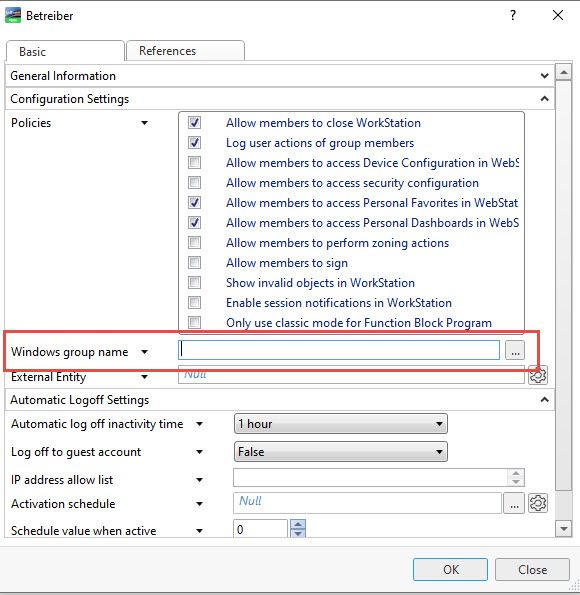
To take advantage of the Active Directory (AD) performance enhancements introduced in recent versions of EcoStruxure Building Operation, it is necessary to re-establish the link between AD groups and their corresponding EBO groups.
Procedure:
- Open the relevant EBO group configuration.
- Locate the Windows group name property.
- Temporarily change its value to an empty string or any placeholder text.
- Re-enter the correct value, which should match the associated AD group name.
- Save the changes to complete the re-connection process.