Issue
Unwanted hardware alarms (and other alarms) are being received at the Enterprise Server from Sigma controllers.
Product Line
Satchwell BAS & Sigma, EcoStruxure Building Operation
Environment
- EcoStruxure Building Operation
- Sigma Release 4_08 (Build 3_46_57)
Cause
Sigma controllers are configured to send hardware and other system alarms to the Enterprise Server, which may not be required in certain operational contexts.
Resolution
To disable these alarms:
-
Access the Sigma Interface:
- Navigate to the Sigma interface within EcoStruxure Building Operation.
-
Locate the Controller (OSN):
- Identify the controller from which you want to disable alarms.
-
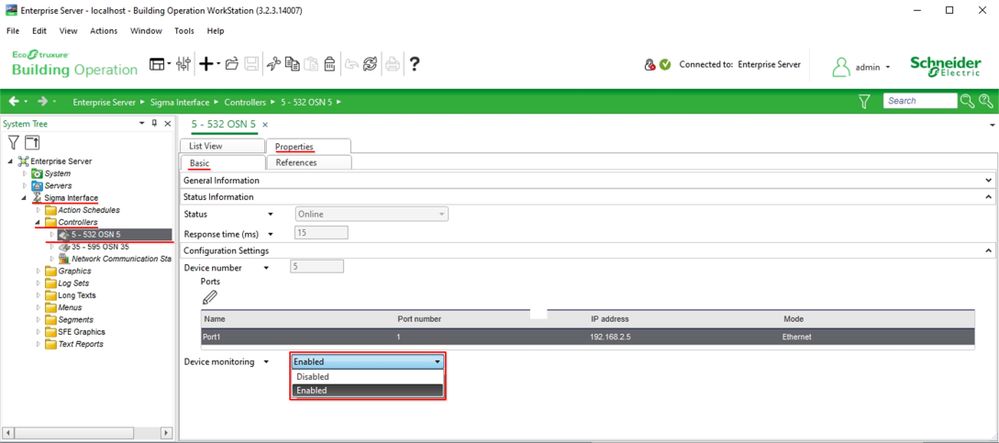
Modify Device Monitoring Settings:
- Select the controller.
- Go to the Basic tab in the Properties panel.
- Locate the Device Monitoring setting.
- Set it to Disabled to stop hardware and system alarms from being sent.
-
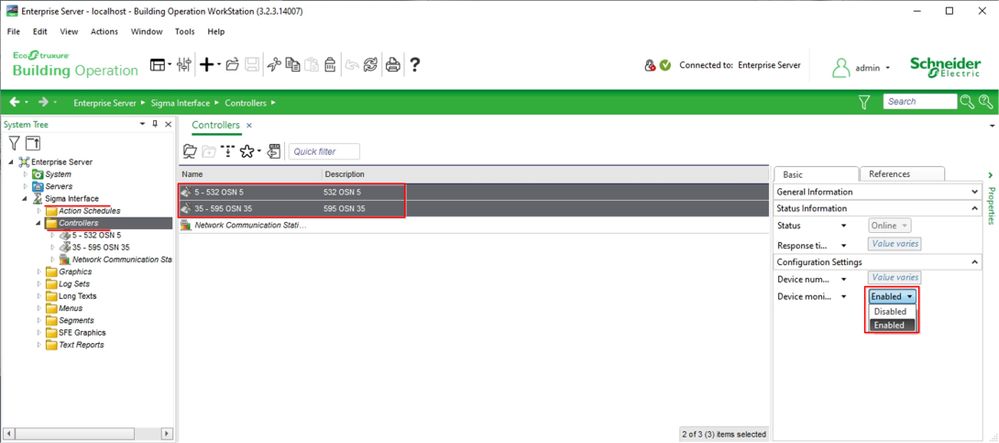
Bulk Update (Optional):
- If multiple controllers need to be updated:
- Multi-select the required controllers.
- Open the Property Panel.
- Change the Device Monitoring setting for all selected controllers simultaneously.
- If multiple controllers need to be updated: