


Ask our Experts
Didn't find what you are looking for? Ask our experts!
Share Your Feedback – Help Us Improve Search on Community! Please take a few minutes to participate in our Search Feedback Survey. Your insights will help us deliver the results you need faster and more accurately. Click here to take the survey
Schneider Electric support forum about installation and configuration for DCIM including EcoStruxure IT Expert, IT Advisor, Data Center Expert, and NetBotz
Search in
Link copied. Please paste this link to share this article on your social media post.
Posted: 2020-07-03 08:49 AM . Last Modified: 2024-04-08 03:44 AM
I'am trying to change background image, but i recive a error and can't change, How can resolve
(CID:110007461)
Link copied. Please paste this link to share this article on your social media post.
Link copied. Please paste this link to share this article on your social media post.
Posted: 2020-07-03 08:49 AM . Last Modified: 2024-04-08 03:44 AM
Hi Miguel, I was wondering perhaps it contains unsupported elements, would you mind to share it with me (off-line) so I can test it locally, thanks. Kind regards
(CID:110007475)
Link copied. Please paste this link to share this article on your social media post.
Link copied. Please paste this link to share this article on your social media post.
Posted: 2020-07-03 08:50 AM . Last Modified: 2024-04-08 03:44 AM
I try to put a .jpg or .dwg but i have no option. How can share with you?
(CID:110007483)
Link copied. Please paste this link to share this article on your social media post.
Link copied. Please paste this link to share this article on your social media post.
Posted: 2020-07-03 08:50 AM . Last Modified: 2024-04-08 03:44 AM
Hi Miguel, Please check your email, you might want to reply with your attached background image (dwg format!), thanks. Kind regards
(CID:110007486)
Link copied. Please paste this link to share this article on your social media post.
Link copied. Please paste this link to share this article on your social media post.
Posted: 2020-07-03 08:50 AM . Last Modified: 2024-04-08 03:44 AM
Hi Miguel,
Many thanks for sharing the image with me, I've tried it locally and it seems the CAD drawing is "unitless". Displayed as a notification (please see the following capture), "Unitless CAD drawing cannot be imported. Please specify a unit of measurement, eg. feet or millimeters in the CAD file and import again."
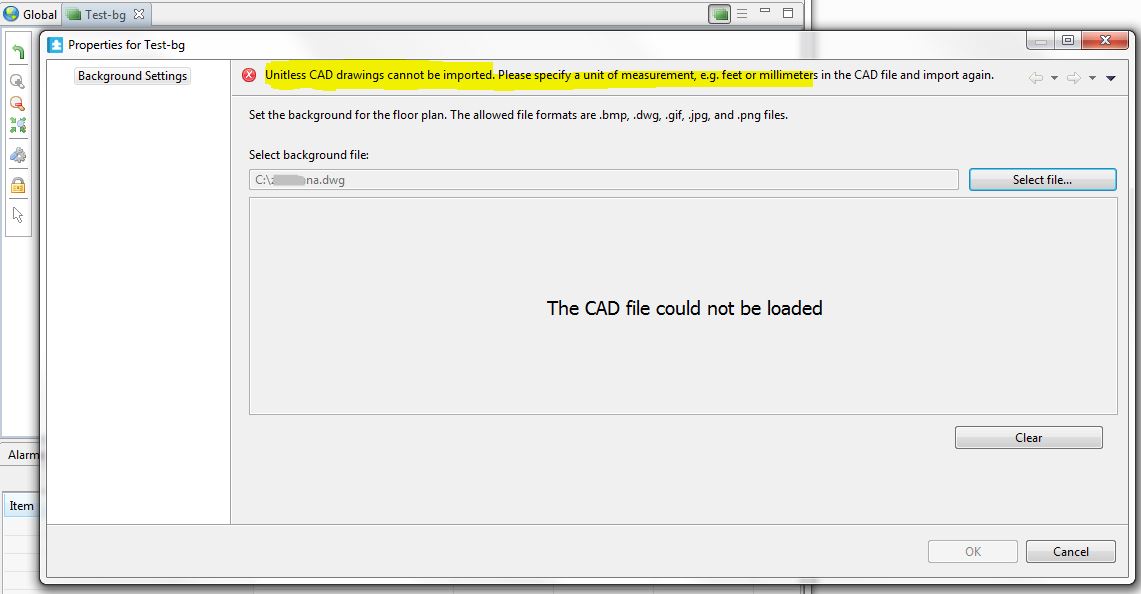
We cannot import unit-less AutoCad files! When a drawing is unit-less, it means we do not know the units of the measurements - the dwg drawing must have measurement units (such as mm) specified to allow import drawing at correct scale.
Kind regards
(CID:110007497)
Link copied. Please paste this link to share this article on your social media post.

Link copied. Please paste this link to share this article on your social media post.
Posted: 2020-07-03 08:50 AM . Last Modified: 2024-04-08 03:44 AM
Jef i have no opcion to input any file neither dwg or jpg, only appear background setting and no more??
(CID:110007506)
Link copied. Please paste this link to share this article on your social media post.
Link copied. Please paste this link to share this article on your social media post.
Posted: 2020-07-03 08:50 AM . Last Modified: 2024-04-08 03:44 AM
Hi Miguel, The drawing itself needs to be "corrected" in AutoCAD, see for example the following video, which illustrates working with units in AutoCAD: https://www.youtube.com/watch?v=dCTO6Gmi9n0&feature=youtu.be Hope this helps, Kind regards
(CID:110007507)
Link copied. Please paste this link to share this article on your social media post.
Link copied. Please paste this link to share this article on your social media post.
Posted: 2020-07-03 08:50 AM . Last Modified: 2023-10-22 04:35 AM

This question is closed for comments. You're welcome to start a new topic if you have further comments on this issue.
Link copied. Please paste this link to share this article on your social media post.

You’ve reached the end of your document

Create your free account or log in to subscribe to the board - and gain access to more than 10,000+ support articles along with insights from experts and peers.
