New Community Ranking System
Our Community ranking system has recently been updated. You may notice changes in user rankings and receive system messages or notifications. If you have questions about how the new ranking works, please refer to the announcement post for more details (click here).
How to remove duplicate sensors Netbotz 355 using Advanced View
EcoStruxure IT Forum
Schneider Electric support forum about installation and configuration for DCIM including EcoStruxure IT Expert, IT Advisor, Data Center Expert, and NetBotz
Search in
Improve your search experience:
Exact phrase→Use quotes " "(e.g., "error 404")
Wildcard→Use * for partial words(e.g., build*, *tion)
AND / OR→Combine keywords(e.g., login AND error, login OR sign‑in)
Keep it short→Use 2–3 relevant words, not full sentences
Filters→Narrow results by section(Knowledge Base, Users, Products)
Send a co-worker an invite to the portal.Just enter their email address and we'll connect them to register. After joining, they will belong to the same company.
You have entered an invalid email address. Please re-enter the email address.
This co-worker has already been invited to the Exchange portal. Please invite another co-worker.
Please enter email address
Send InviteCancel
Invitation Sent
Your invitation was sent.Thanks for sharing Exchange with your co-worker.
Link copied. Please paste this link to share this article on your social media post.
Posted: 2020-07-0508:28 PM. Last Modified: 2024-04-0301:12 AM
How to remove duplicate sensors Netbotz 355 using Advanced View
We moved a 455 wall monitor to a new location where it is stand alone. Duplicate sensors now show up in the pod list with a (1) behind the name. How do we remove those?
Link copied. Please paste this link to share this article on your social media post.
Posted: 2020-07-0508:28 PM. Last Modified: 2024-04-0301:12 AM
Hi Jim,
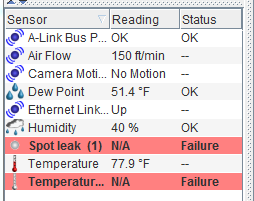
The only reason you should have duplicates is if you connected the sensors to different ports. In this case, one sensor should be in an OK state and one should be disconnected. Here you can see I have 2 sensors in a failed state:
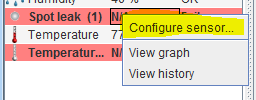
If I right click on one of them and choose configure sensor:
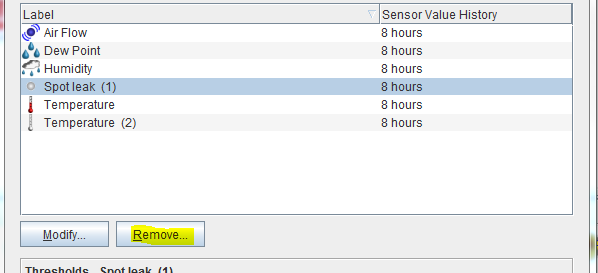
I have the option to remove this sensor:
If I select a sensor that is still connected, that "Remove" option will be grayed out.