Continue
Help
  • Explore Community
  • Get Started
  • Ask the Community
  • How-To & Best Practices
  • Contact Support
Notifications
Login / Register
Schneider Electric
Community
Community
Notifications
close
  • Categories
  • My Subscriptions
  • Forums
  • Knowledge Center
  • Blogs
  • Ideas
  • Events
Help
Help
  • Explore Community
  • Get Started
  • Ask the Community
  • How-To & Best Practices
  • Contact Support
Login / Register

Contact Support

Close

Ask our Experts

Have a question related to our products, solutions or services? Get quick support on community Forums

Email Us

For Community platform-related support, please email us

New Community Ranking System
Our Community ranking system has recently been updated. You may notice changes in user rankings and receive system messages or notifications. If you have questions about how the new ranking works, please refer to the announcement post for more details (click here).

Niagara Station Install Error: “Transfer failed. DaemonResponseException”

Building Automation Knowledge Base

Schneider Electric Building Automation Knowledge Base is a self-service resource to answer all your questions about EcoStruxure Building suite, Andover Continuum, Satchwell, TAC…

Search in

Improve your search experience:

  • Exact phrase → Use quotes " " (e.g., "error 404")
  • Wildcard → Use * for partial words (e.g., build*, *tion)
  • AND / OR → Combine keywords (e.g., login AND error, login OR sign‑in)
  • Keep it short → Use 2–3 relevant words , not full sentences
  • Filters → Narrow results by section (Knowledge Base, Users, Products)
cancel
Turn on suggestions
Auto-suggest helps you quickly narrow down your search results by suggesting possible matches as you type.
Showing results for 
Show  only  | Search instead for 
Did you mean: 
  • Home
  • Schneider Electric Community
  • Knowledge Center
  • Building Automation Knowledge Base
  • Niagara Station Install Error: “Transfer failed. DaemonResponseException”
Options
  • Bookmark
  • Subscribe
  • Email to a Friend
  • Printer Friendly Page
  • Report Inappropriate Content
Invite a Co-worker
Send a co-worker an invite to the portal.Just enter their email address and we'll connect them to register. After joining, they will belong to the same company.
You have entered an invalid email address. Please re-enter the email address.
This co-worker has already been invited to the Exchange portal. Please invite another co-worker.
Please enter email address
Send Invite Cancel
Invitation Sent
Your invitation was sent.Thanks for sharing Exchange with your co-worker.
Send New Invite Close

Related Forums

  • Intelligent Devices Forum

Previous Next
Contributors
  • CraigEl
    CraigEl

Invite a Colleague

Found this content useful? Share it with a Colleague!

Invite a Colleague Invite
Back to Building Automation Knowledge Base
Start a Topic
Options
  • Bookmark
  • Subscribe
  • Email to a Friend
  • Printer Friendly Page
  • Report Inappropriate Content
2 Likes
10224 Views

Link copied. Please paste this link to share this article on your social media post.

Trying to translate this page to your language?
Select your language from the translate dropdown in the upper right. arrow
Translate to: English
  • (Français) French
  • (Deutsche) German
  • (Italiano) Italian
  • (Português) Portuguese
  • (Русский) Russian
  • (Español) Spanish

Niagara Station Install Error: “Transfer failed. DaemonResponseException”

RandyDavis Champion
‎2023-03-14 01:09 PM

Last Updated: CraigEl Champion ‎2026-03-02 05:13 PM

Issue

When installing a Niagara station .bog file, the following error appears:

Transfer failed. com.tridium.platform.daemon.DaemonResponseException: bad return code to commit file instance

This typically occurs during station transfer to an Enterprise Server or JACE device.

Product Line

TAC IA Series

Environment

  • I/A Series N4 Enterprise Server
  • I/A Series N4 Jace

Warning

Potential for Data Loss: The steps detailed in the resolution of this article may result in a loss of critical data if not performed properly. Before beginning these steps, make sure all important data is backed up in the event of data loss. If you are unsure or unfamiliar with any complex steps detailed in this article, please contact Product Support for assistance.

Cause

The error occurs when:

  • The .bog file is not located in the proper User Home → Stations directory before transfer, or
  • The passphrase used to protect the .bog file is unknown or incorrect

As a result, Workbench cannot validate or unpack the station archive.

Resolution

  1. Always use the Station Copier

    • Install the station .bog from the designated User Home → Stations folder.
  2. If the error occurs:

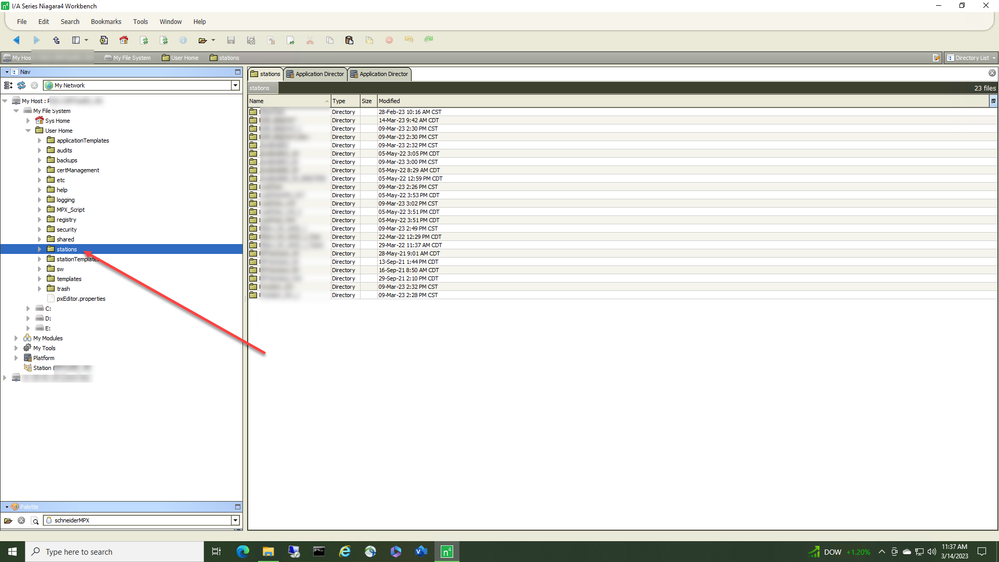
    • Open Workbench
    • Navigate to User Home → Stations

      Error_1.png

    • Expand the station folder
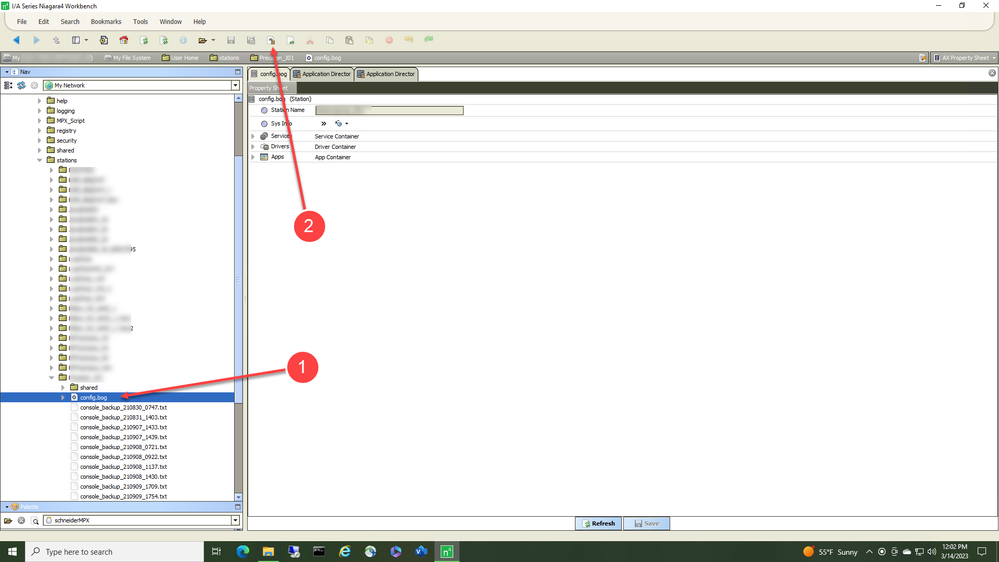
    • Double‑click the .bog file to open it
  3. Force Start the Station

    • In the .bog file view, select the Bog File Protection icon

      Error_4.png

    • Choose “Force the file to start…”

      Error_2.png

    • Click Update

    Note: This operation may affect stored passphrases or security settings inside the .bog.

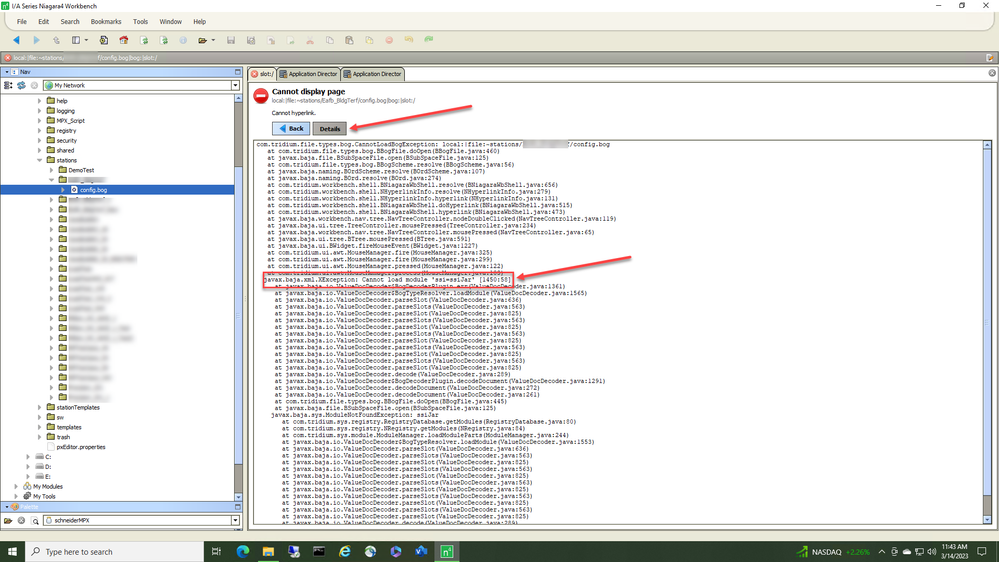
  4. If “Cannot display page” appears when opening the .bog:

    • Open Details
    • Look for missing module messages such as:
      Cannot load module 'xxxx=version'.

      Error_3.png

    • Ensure all required modules are installed on the JACE or ES before retrying the force start.
Labels (1)
Labels:
  • TAC IA Series
Tags (2)
  • Find more articles tagged with:
  • CraigEllis26
  • RandyDavis23
Was this article helpful? Yes No
100% helpful (3/3)

Link copied. Please paste this link to share this article on your social media post.

You’ve reached the end of your document

WHAT’S NEXT?

Ask our Experts

Didn't find what you are looking for? Ask our experts!

My Dashboard

Check out the new Feeds and activities that are relevant to you.

To The Top!

Forums

  • APC UPS Data Center Backup Solutions
  • EcoStruxure IT
  • EcoStruxure Geo SCADA Expert
  • Metering & Power Quality
  • Schneider Electric Wiser

Knowledge Center

Events & webinars

Ideas

Blogs

Get Started

  • Ask the Community
  • Community Guidelines
  • Community User Guide
  • How-To & Best Practice
  • Experts Leaderboard
  • Contact Support

    Ask our Experts

    Have a question related to our products, solutions or services? Get quick support on community Forums

    Email Us

    For Community platform-related support, please email us

Subscribing is a smart move!
You can subscribe to this board after you log in or create your free account.
Forum-Icon

Create your free account or log in to subscribe to the board - and gain access to more than 10,000+ support articles along with insights from experts and peers.

Register today for FREE

Register Now

Already have an account? Login

Terms & Conditions Privacy Notice Change your Cookie Settings © 2026 Schneider Electric

Welcome!

Welcome to your new personalized space.

of

Explore